
FruitfulTime Task Manager is a program that can help you manage tasks and stay organized. It allows you to add a task and assign subtasks to keep the list ordered. Tasks can also be given priority and tagged with keywords & due dates.
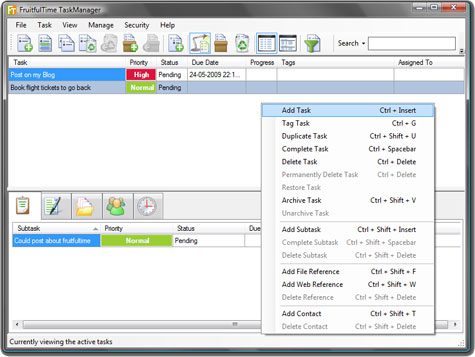
It’s super lightweight (317 kb) and can be installed easily by click the next button. Using the program was pretty simple, just right click inside the program and choose create task. Once a task has been created, it can be assigened a due date and also given priority.
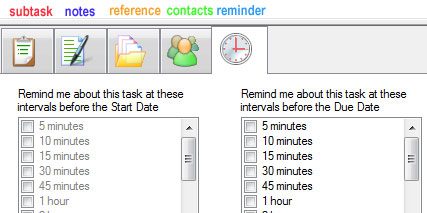
After clicking on a task, you can add additional info like subtasks, notes, references, contacts and reminder options.
The user can also set a security password. Once a password has been set, you will have to enter the password in order to see the tasks. A to-do list is a lot of sensitive information and the password feature prevents it from being misused.
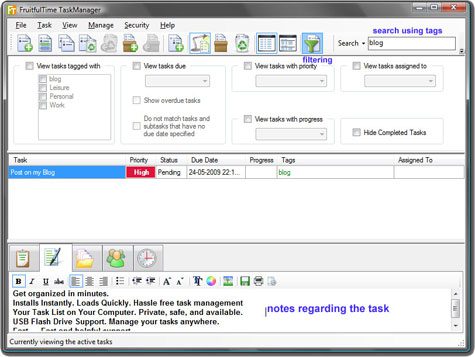
Tasks can be archived once they are done, these tasks and deleted ones can be viewed later by choosing View from the top menu. Older tasks can be searched by tags assigned to them, there are also filters which can be used to narrow down the search. Another interesting feature if that the program can be installed on a USB drive and can be used on any Windows computer.
Overall a very useful software if you are working and need to keep yourself organized while meeting all your deadlines.
The people over at FruitfulTime have been very considerate to give our readers Five Licenses of the full version worth 30$ each for FREE.
If you’d like a copy, leave a comment below and tell us why you should get it.
Download FruitfulTime Task Manager




Just wondering, is this the full version or the lite (home) version?
The licenses are for the full version of the program.
I have used Active desktop calender.I am intersted to try FruitfulTime Task Manager.That depends if I am Lucky !.Thanks.
Interesting. I was looking for a off-line application to organize my life… Thanks!
I need this to organize my activities… getting distracted by disorganization and improper time management. I hope this can help. There’s only so much time in a day, after all.
Thanks!
I really need this man because I suck at remembering things and stuff and also cos iam loyal visitor on this site :)
awesome contests m8
Hi Alfred,
I love a copy of that task manager to make my job organized and achieve my goal. Thanks!
Alex
Congrats to the winners. Please Check your emails for instructions.
https://alfred.co.in/contest/contest-winners-fruitful-time-task-manager/