
Export email address of Facebook friends
Facebook has become so popular that you might have more personal and business contacts in your Facebook account than your email accounts. Wouldn’t it be awesome if you could export the list into your webmail or email contacts ? While there are a few apps and Greasemonkey scripts that can do this, the easiest way is to use a Yahoo service !
How to export email address of Facebook friends into a CSV file
First we need to go to address.yahoo.com, click on the Facebook icon on this page. A new window will open asking if you want to share your contacts with Yahoo. Click Okay to proceed.
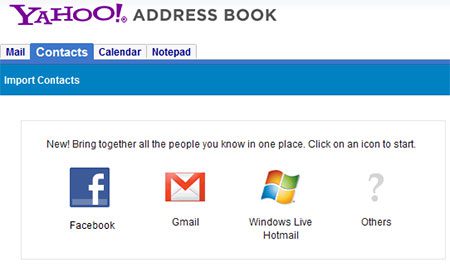
Yahoo will now import all your contacts and give you an recap on the number of contacts that were imported.

Once all the contacts have been imported you can use the export function in Yahoo contacts to export them to a format of your choice. I would recommend exporting them to the CSV format since it is supported by almost all email clients and services. Access the Yahoo Contacts Export to do this.
You can now use this CSV file to import your contacts to Gmail or desktop email clients. Follow instructions on how to import CSV into Gmail. If the contacts had some error head over to Facebook’s application settings page and remove Yahoo Contacts Importer and try again.
This post is about export email facebook,facebook email to csv,facebook emailcontact export csv,greasemonkey,greasemonkey extract email,how do you export facebook friends to your aol email,how to export email from facebook,how to export email id from facebook account,how to export facebook friends email id to csv,how to exporting facebook friends as csv,how to import facebook emails to excel,script to export facebook emails to csv,facebook email export,facebook email csv,export facebook email list from yahoo,export facebook email to csv.Related posts:
- Import Facebook Contacts to Google Plus
- Sync Outlook Contacts with Facebook Friends
- Facebook Instant Messenger (IM) – Use Facebook Chat outside Facebook
- How to track email & know if your recipient read it
- Blackberry Facebook Chat App – ChitChat
Discover and Share Take a moment to share this post on social networking sites !
View other post by Alfred
Did you enjoy this post? Why not leave a comment below and continue the conversation, or subscribe to my feed and get articles like this delivered automatically each day to your feed reader. If you don't have a feed reader, you can always have these articles delivered to your email inbox every day. Click here to sign up.
Trackbacks & Pingbacks
[...] using Yahoo Contacts and then importing them into Google Plus. All the steps are given in our Export email address of Facebook friends post. Follow the steps given in that [...]
Comments
Leave a comment
Line and paragraph breaks automatic, e-mail address never displayed, HTML allowed: <a href="" title=""> <abbr title=""> <acronym title=""> <b> <blockquote cite=""> <cite> <code> <del datetime=""> <em> <i> <q cite=""> <strike> <strong>


Nice hack. The irony is that when someone connects to FB he is asked for his email accounts to import contacts from there.
Hey I never knew I could use my yahoo account in this way. That’s great, will try it out now!
