

I noticed that the email subject line for my RSS feed was always “TechiePortal”. This does not give any info about what the email is about and the subscriber has to open the email before he can see the post title. Feedburner allows you to change the email subject line.
Feedburner is being used by most blogs to publish their RSS feeds, it also offers readers the option to subscribe to the RSS feed via email. Many users prefer to have emails sent to them because they are not familiar with feed readers. By having good, precise email subject lines, readers will know what to expect when checking their emails. They are more likely to open the email this way.
How to change FeedBurner Email Subject Line
- Login to Feedburner
- Click on the Publicize Tab
- Choose Email Subscriptions from the right navigation menu
- Click on Email Branding sub menu
- Now you have the option to change the email title.
- Change the feedburner email subject / title as required.
- Adding ${latestItemTitle} in the title will replace it with your Posts title
- Scroll down and click Save.
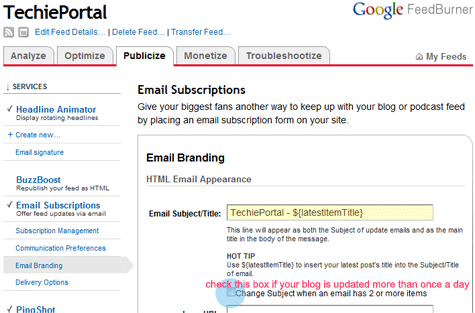
If your blog is updated more than once a day, check the “Change Subject when an email has 2 or more items” box. Now you have 2 new commands to use. ${n} shows the total number of items, and ${m} shows the number of items beyond the latest.
Examples
TechiePortal – ${latestItemTitle}
TechiePortal -“${latestItemTitle}” plus ${m} more
TechiePortal (in this message: ${n} new items)




Do you think there’s a function to put your last post’s title in the subject of a feedburner newsletter?
Nice easy to follow instructions – bye bye boring email subjects cheers
.-= Dave Furnevall´s last blog ..Internet Marketing Is Killing Me!! =-.
@ John
“${latestItemTitle}” plus ${m} more
this would pull the latest title into your subject line
@ Dave
Glad I could help you
I have a problem with my Feedburner email alerts. There is a clickable link with the title of my blog entry, followed by the same text in the first line of the email alert summary text. How can I remove that repeated text? Thanks in advance for your assistance.
Sorry, I wanted this to my previous comment, but sent it too soon. This is an example of my problem feed:
Le Clos Ornasca: A Corsican heart of gold
By tomfiorina on Corsica
[THIS IS THE CLICKABLE LINK]Le Clos Ornasca: A Corsican heart of gold is a post from: The Vine Route
[THIS IS THE REPEATED TEXT]Le Clos Ornasca: A Corsican heart of gold is a post from: The Vine Route When I telephoned Laetitia Tola about setting up an appointment, the owner of the AOC Ajaccio vineyard Le Clos Ornasca agreed, but she wanted to know how long it would take. “Several hours,” I replied, explaining that I needed to interview […]
hmmm either you entered the tag twice (probably not the reason)
or you have a plugin on your site that is doing that. Check any plugin or code that might be adding that extra title.
This post only shows how to change the email subject. it does not change the contents in any way.
How can I add the author’s name to the subject or in the email body itself? I have a team blog but emails sent out do not show that posts come from different authors.
Thank you! very useful article
Thanks, this was a handy tip. I see that the tip is now available within the feedburner email settings itself, but I probably wouldn’t have found it if I hadn’t looked here first.
Thank you! This was the info I needed!
Oh Thanks for this lovely Article so on point and easy to implement.
Keep on the good works Bro