
How to track email & know if your recipient read it


Faced those times when you sent an important email to someone and later they told you that the email wasnt received ? This service can help you.

spypigSpypig is an email tracking service that will send you a notification when your recipeint receives your email. It works with most popular email services like Gmail, Yahoo and email clients like Outlook and Thunderbird.

The service is free and very simple to use. Just enter your email address and the subject of the email you wish to send. Then choose a tracking image and the number of times you wish to be notified about the recipient opening your email. On activation, it should show you an image, right click the image and paste it into the email you wish to send.
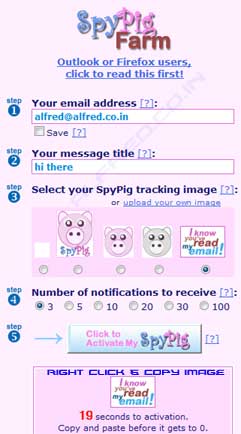
spypig

Try SpyPig

This post is about how to know if email was read,email tracking thunderbird,track recipient email,how can you tell if an email was read,trace email recipient location,how to track email recepient,how to track email read or not,how to track email recipient,how to track email newsletter with thunderbird,how to track if a yahoo email is opened,how to track if client read email,how to track if email from cell phone is opened,how to track if email has been opened,thunderbird and email tracking,how to track if email has been read by recipient,how to track if email is read.

Related posts:

  1. Police use Google to track GPS location of kindappers cellphone
  2. Export email address of Facebook friends
  3. MailBigFile.com – Email large attachments
  4. Read It Later – Create a list of pages to read later
  5. RupeeMail – It pays to read emails


Discover and Share Take a moment to share this post on social networking sites !
The Author
Alfred is a Pilot & Tech blogger from Bangalore, India. He has worked with DSL providers like AOL, SBC, Verizon & Covad as a tech specialist. Currently he is pursuing a career in aviation.
View other post by


Did you enjoy this post? Why not leave a comment below and continue the conversation, or subscribe to my feed and get articles like this delivered automatically each day to your feed reader. If you don't have a feed reader, you can always have these articles delivered to your email inbox every day. Click here to sign up.

Trackbacks & Pingbacks

No trackbacks/pingbacks yet.

Comments

The problem is that regarding email one just can talk of “seen” email, this is, mail opened in the client. You can’t tell if an email has truly been “read” or not.

Moreover I don’t think it fits into “netiquette” sending this kind of confirmation.

Very less free service like this right now. Maybe can have a try with whoreadme.com, readnotify too.

Leave a comment

(required)

(required)


Line and paragraph breaks automatic, e-mail address never displayed, HTML allowed: <a href="" title=""> <abbr title=""> <acronym title=""> <b> <blockquote cite=""> <cite> <code> <del datetime=""> <em> <i> <q cite=""> <strike> <strong>
