
In our previous post, we were giving away 50 Free Licenses for Comodo Internet Security Pro. To be sure that the licenses were not being sent to fake email addresses, we sent one mail asking the winners to reply to the email before we sent them the license code. So that’s 2 emails per winner X 50 winners = 100 emails to be sent. Copy pasting the template proved quite a hassle but it led me to email templates in Gmail.
How to Use Email Templates in Gmail
Gmail labs has a feature that allows you to make email templates that can be used to instantly reply to common emails.
To Access the Gmail Labs we need to click on the Green Test Tube on the right corner of Gmail. On this page Enable the Canned Responses feature. Click Save Changes.
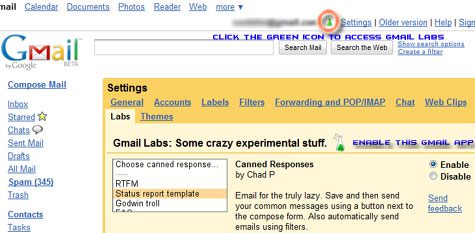
Now that the Canned Responses feature is available for our use, we are ready to setup some email templates.
Click Compose Mail or open an email you would like to reply to. Enter the message and click on the Canned responses button (appears below the Subject line). Gmail will now save the contents of the message you typed as a email template.
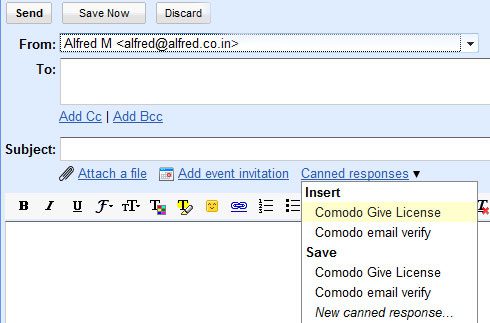
To use the template again in another email, just click Canned Responses and choose the template to insert.
Have any tips for us ? Share your comments below.




Wow, ini never thought that Gmail have an template, i’m using Yahoo too much so i’ve got no experience with Gmail too much. Thanks for sharing. I’m gonna try it with my Gmail account.
Thanks for the comment.
I stopped using Yahoo a long time ago, worked for some companies that have access to Yahoo. The amount of abuse these employees do with Yahoo Mail made me stop using it.
Im not Anti-Yahoo, i still have my ID which i made 10 years ago, just dont use it much.
Yeah me too, recently i seldom using yahoo because my blog using Google Apps as an email so right now i’m often using Google Apps than Yahoo mail. I even dunno is Google Apps can considerate as Gmail. :grin:
Great info. Thanks Alfred!
.-= enXi´s last blog ..Download Firefox 3.5 RC1 =-.
Do you know of a widget that allows you to share an email template across users in a google apps scenario?
I want to create a gmail template wher the to: and Subject: are both pre-Filled
I want to use this for Email to fax application
Very good post. I saw a webpage with a post as good as identical to this one a few of days ago. This article is a week older so I recon they have just copied and eddited it. I am not accusing you of plagiarism it’s merely just head’s up. I can not remember the page, sorry (age thing)
I CAN’T REMEMBER MY PASTWORD
For signature i use Brandmymail ( http://www.brandmymail.com ), which has full control over email signature and overall template :)