
Firefox crash while adding image in Wordpress – Fix
Since I updated to Firefox 3.0.10, Firefox always crashes while trying to insert an image into a Wordpress post. This forces me to use Internet Explorer 8, which I might add is horribly slow for me.
How to stop Firefox from crashing while adding images in Wordpress
- Open Firefox
- Click on Tools in the Menu and choose Addons
- Disable Google Gears
- Enjoy ! No more crashes !
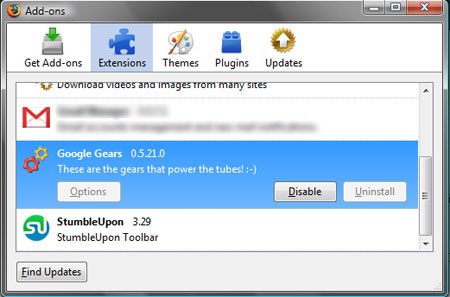
Such a simple fix but the mental torture to find it was horrible. hehe
Related posts:
- GTA San Andreas Vista Crash / Freeze fix – How to
- Witcher Vista Crash Fix – How to
- Download Firefox 3.5
- You downloaded FireFox 3, claim your certificate now !
- FireFox 3 available on Mozilla ftp server
Alfred is a Pilot & Tech blogger from Bangalore, India. He has worked with DSL providers like AOL, SBC, Verizon & Covad as a tech specialist. Currently he is pursuing a career in aviation.
View other post by Alfred
Discover and Share Take a moment to share this post on social networking sites !
Did you enjoy this post? Why not leave a comment below and continue the conversation, or subscribe to my feed and get articles like this delivered automatically each day to your feed reader. If you don't have a feed reader, you can always have these articles delivered to your email inbox every day. Click here to sign up.


No comments yet.
Leave a comment
Line and paragraph breaks automatic, e-mail address never displayed, HTML allowed:
<a href="" title=""> <abbr title=""> <acronym title=""> <b> <blockquote cite=""> <cite> <code> <del datetime=""> <em> <i> <q cite=""> <strike> <strong>
