
My mom runs a blog and one of her readers wanted to know how to add AdSense to her blogger account.
Before we start you need an AdSense account. If you don’t have one click on the image below to register.
Once you have an account, blogger makes it very simple to add AdSense to your account.
Go to your blog settings > templates > Add a page element > choose AdSense
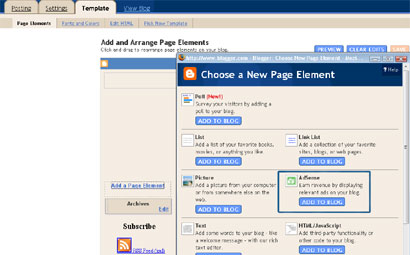
Click on sign in > enter the email address you provided for the adsense account > enter either your zip code or the phone number you provided at registration.
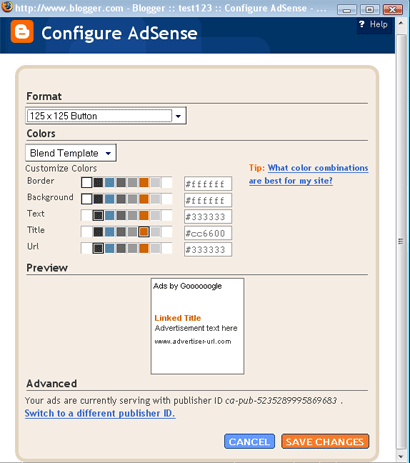
Now on the following page you can choose the Ad format (size of the add), color, etc. Try to make the ad blend with the background by choosing the same background and border color. There are many blogs about adsense that can give more tips regarding the same.
Another wayis to login to your AdSense account > click the AdSense setup tab and go through the wizard. Once you have the code provided by Adsense, enter it as a normal widget into blogger using the HTML/Javascript page element.
If you need any help feel free to contact me via comments or email.




What a pleasant surprise!!!Lissie has a grown up son!!!Nice to meet you Alfred..
I am your moms reader who had put up the query..:)..
Soooo nice of you to put up a separate post for the purpose..:)..cant thank with words..
I must have an account with a credit card first before entering this ..:)..I may come up with more queries then..:)
Thanks a TON alfred..I will link this post of yours in my test blog for future ref,,:)
Not a problem, just wanted to let you know that you don’t need a credit card for Adsense, they will send a check, once your account has 100$.
appo enda njan cheyyende…should I give them my bank account detail?, alfred,to start with..??starting trouble annu..:)…Tamil naduvil ethu bank ayalum avar ayakkumo??..pls advice alfred!!:)