
 We have been designing a new sister site and in the process had to test Adsense ads to fit the layout of the new theme. According to Google, we are not allowed to display Adsense on pages that are under construction. So how are we to test how the ad unit will look ? Finally we found a solution…
How to test / preview Google Adsense Ads
- Get the Adsense code for the ad you wish to test ( You should know how to do this ).
- Add the following code after the second line of the adsense code
- You new code should look like this
- The ads will be displayed as a test and will not be counted towards the normal page displays or eCPM.
google_adtest = “on”;
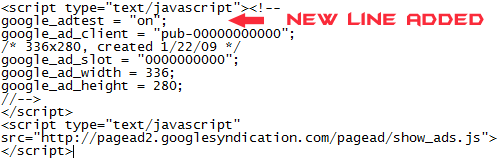
Hope this helps some of you. Feel free to leave your comments below.




Alfred,
I think that this is a great find due to the fact that I am new to blogging and have not decided on the final layout of my site. It will allow me to test as much as I would like without being “scolded” by Google.
Keep up the good work.
Juscelino M. Acevedo’s last blog post..(My) Top 5 Hip-Hop Sites
Glad that I was able to help you out.
Its been a learning process for me with the new site. Got to learn so much about CSS just because I had to get the job done.
If you find yourself in a similar situation I recommend you check out smallpotato wordpress design guide. Sorry forgot the url, just search.
Again thanks for the comment.
Hey that is fantastic.
I’ve always left the ads in when doing development. Although I’ve never got into trouble with google, it has made a mess of my statistics.
I’ve never seen this before, it’ll make life a lot easier!
Thanks!!
Haven’t tried this trick yet, but is it authorized by Google?
This is Google’s reply to the question. Try it your self, you arent changing the script its only comments and will work only if google allows it.
Nice tips. very helpful for me