
I am a hardcore Firefox fan and refuse to shift to Internet Explorer or Chrome. For some reason I had to login on two different ID’s on the same system, so used my IE 8. While logging into this blog I got the KB927917 error. IE would then open a blank page. Trying to find a fix for this took me quite some time to figure out, since answers on other sites were not working.
Internet Explorer cannot open the Internet site. Operation Aborted.
According to a site, this error was being caused by Kontera script which I run on this blog as well. Turning off the plugin did not stop the error. Another site said that it was being caused due to a sitemeter script update that caused it. Both these errors occured in 2007 & 2008.
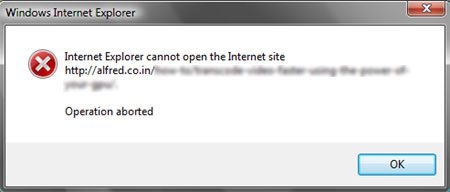
After looking through all the javascript running on my blog, I finally found that this error was being caused by Google FriendConnect. This is a popular widget which works like MyBlogLog and allows your visitors to join a site’s community.
Removing this widget has finally fixed this error and saved me many visitors who would have otherwise never seen my blog. Microsoft’s Support site, has information on the cause of this error and how to fix it.
Does anyone know a way I could get back Friend Connect without getting this error ? Let us know, leave a comment.




I’ve had this error message (and went nuts), but I cracked (not my head) the code, just in time.
This is what I did –> http://zeebigtourist.blogspot.com/2009/06/internet-explorer-cannot-open-internet.html
Thanks for all the helpful info.
ZeeBigTourist
.-= ZeeBigTourist´s last blog ..Internet Explorer cannot open the Internet site | Operation aborted =-.
Thanks for your article. I had this problem which IE7 on some sites, even Google. Updating to IE8 fixed it!
.-= adminbox.de´s last blog ..Endpoint-Security, Teil 2: Devicemanagement =-.
If you are just a reader upgrading to IE 8 would stop most errors. But as a blog owner we have to make sure that the site is accessible by all readers.
This recently happened to me, and it was very frustrating! Here’s what I did to solve the problem: http://blog.timothyponce.com
It involves moving the JavaScript of third-party widgets to the bottom of the page so they don’t interfere with Friend Connect.
.-= Timothy´s last blog ..Internet Explorer cannot open the Internet site… Operation aborted. =-.
The mybloglog recent visitor widget cannot be viewed in IE that’s the only widget i have a problem now. other widget works fine on me. http://78268hdy4dubvv763ri8uw6wed.hop.clickbank.net/?tid=1218
I am having this problenm in my Sarkari Naukri Damad http://sarkari-damad.blogspot.com/ blogsite.
Please guide my how to fix this problem.
Cause: The particular IE version restricts the modification of parent DOM element before all of its child element are rendered completely.
It is particularly caused if some modification to parent element is done in onbodyload events and before body finishes its rendering.
Solution: This is a known issue in I.E.8 and Microsoft site posts suggests installation of Cumulative Security fix pack version KB2360131
(Available on http://www.microsoft.com/download/en/details.aspx?id=13228 ) to resolve this issue.
I successfully reproduced this issue on two laptops and was able to resolve it after installing this fix pack. I also tried to uninstall this fix pack and issue reoccurred.
References:
http://social.msdn.microsoft.com/Forums/en/iewebdevelopment/thread/db34068c-5307-4ab7-be03-15b86c2604bb
Aha, i noticed at the end the part they tried to blur out it says.
How to framecode video faster using the power of “couldn’t read the last word”
Im obliged for the article.Actually trying forward to read more. Fantastic.