
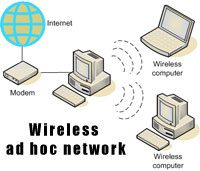
 I am an avid gamer and at times we have lan parties at our friends place. Wireless networks are usually a must in order for all our laptops to connect to the internet. In this post I will show you how to setup wireless networks without using a router.
How to setup wireless network without a router
This guide is for Windows Vista. Guides for WinXP and Windows 7 are given at the end of this post.
Connect your computer to the internet using a Ethernet Connection (Lan Cable)
Open Control Panel, then click on Network and Sharing Center (title)
Now click on the Set up a connection or network
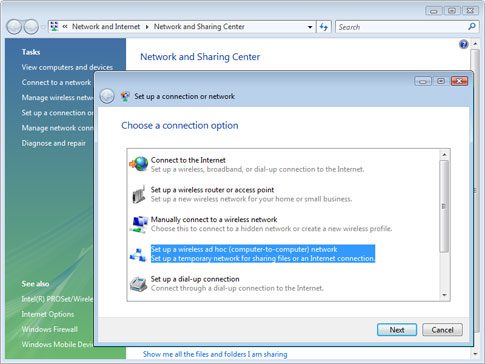
Now on the new window that comes up choose Set up a wireless ad hoc network. Click Next
Click Next again on the following screen.
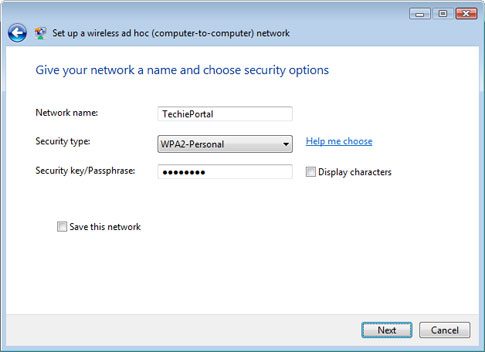
On this screen enter a name for your network. Then choose a security type. We recommend you set this to WEP or WPA. Also enter a password for this network.
Click on Turn On Internet Connection Sharing. Click Next.
Your wireless network is setup and ready to be used. Other computer can now connect wirelessly to the network you just made.
Setting up wireless network on Windows 7 is much easier and can be done using Virtual Router. Instructions for this software is available on its website.
Windows XP users can read the guide over at Digital Inspiration.




sorry, I don’t see the XP link?
can you add that please?
Nice. Now I can tell my friends, “Maybe you guys can have a Lan party too.” Hehe. Thanks for the idea and the instructions.
This is a place for great inspiration, your blog is really interesting
Excellent post
very nice blog..It helps me a lot..Thanks…
@Carl Click on the digital inspiration link in the post for the XP guide
I think you research a lot for things like this..thanks for the info..
Savi Phones -Online Store for Headsets
My brother recommended I might like this web site. He used to be entirely right. This publish actually made my day. You cann’t imagine just how a lot time I had spent for this info! Thanks!