
TechiePortal
  • Home
  • About
  • Contact
  • Sitemap

Start Azureus in advanced mode / classic view – How to

Navigation : Home » How To » Start Azureus in advanced mode / classic view – How to

azureusI use Azureus a lot to download torrents. One feature that irritates me a lot is that Azureus starts up in Vuze mode, which contains a lot of inappropriate videos on the main page. This can get you in trouble if you are at work…

There are two ways to avoid the Vuze screen and start up directly in the Advanced / Classic mode.

Starting up in Advanced Mode

  • Switch to the Advanced tab (top right corner)
  • Open Tools and click on Options
  • Click and Interface and then click the Start subitem
  • Check the box Start in Advanced View

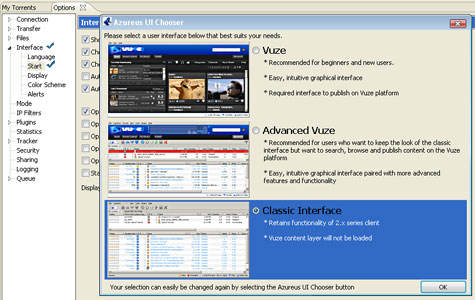
Starting up with the classic Interface (Vuze will not start)

  • Switch to the Advanced tab (top right corner)
  • Open Tools and click on Options
  • Click and Interface and then click the Start subitem
  • Click the Show button next to Display Azureus UI chooser
  • Choose the Classic Interface from the popup box
azureus_ssc.jpg

The next time you start Azureus it will not load Vuze.

Topics: How To | Posted by Alfred
Tags:

Related posts:

  1. Google Reader Offline mode – Read feeds while you are offline
  2. Unblock Programs from Vista Startup – How to
  3. How to Rip a DVD
  4. Compress Video taken by Camera into small size with VirtualDub
  5. Uninstall Windows Media Player 11 – How to


About the Author of this post
The Author
Alfred is a Pilot & Tech blogger from Bangalore, India. He has worked with DSL providers like AOL, SBC, Verizon & Covad as a tech specialist. Currently he is pursuing a career in aviation.
View other post by Alfred

Discover and Share
StumbleUpon Digg del.icio.us Technorati Reddit RSS Feed
Take a moment to share this post on social networking sites !

Did you enjoy this post? Why not leave a comment below and continue the conversation, or subscribe to my feed and get articles like this delivered automatically each day to your feed reader. If you don't have a feed reader, you can always have these articles delivered to your email inbox every day. Click here to sign up.

Previous Post
Next Post

Trackbacks & Pingbacks

No trackbacks/pingbacks yet.

Comments

the start subitem is not showing

Comment by Derek on December 16, 2007 @ 12:43 am

What do you mean by the start subitem ? Could you be a bit more specific ?

Comment by Alfred on December 16, 2007 @ 4:29 pm

I am really shocked nobody else has given you credit for telling them how to knock off that horrible new interface they created and half way forced people to use. I for one am very thankful for your advice. I know it’s not to hard to find and have turned it off once before for a friend but that was a while ago and forgot how to again. I know this saved me at least 15 minutes of popping through all the options menus.

Comment by Joe on March 23, 2008 @ 8:41 am

Thanks for putting this up. Much appreciated!

Comment by Jase on April 9, 2008 @ 2:53 am

:cool: thx man, i °hate° the new interface… it’s too overloaded – back to the roots ;)

greez

Comment by macuser on October 7, 2008 @ 3:45 pm

thanks man!
old school rocks! :D

Comment by makiavel on March 13, 2009 @ 6:23 am

Glad I could help.

I have stopped using Azureus and have shifted over to Utorrent. Azureus was using too much ram and cpu cycles, Utorrent is only about 250kb i think and runs very smoothly.

Comment by Alfred on March 14, 2009 @ 10:30 pm

Leave a comment

(required)

(required)


Line and paragraph breaks automatic, e-mail address never displayed, HTML allowed: <a href="" title=""> <abbr title=""> <acronym title=""> <b> <blockquote cite=""> <cite> <code> <del datetime=""> <em> <i> <q cite=""> <strike> <strong>

Subscribe to RSS Feed
1581 Subscribers
Signup for our Free Email Newsletter, No Spam

Meet the Author
The Author
Alfred is a Pilot & Tech blogger from Bangalore, India. He has worked with DSL providers like AOL, SBC, Verizon & Covad as a tech specialist. Currently he is pursuing a career in aviation.

Connect With Us
Follow us on Twitter Join us on Facebook Fav us on Technorati
iPhone Theme for Windows Mobile
  • Recent Posts

    • Best Alternative Music player for Windows – List
    • 12GB free online storage with sync capability
    • Best Defrag software – Top 5
    • Blizzard Authenticator PC version – How to
    • Add effects to video from our webcam
  • Categories

    • Audio / Video
    • Browser
    • Cell Phone
    • Contest
    • Email / IM
    • File Conversion/Storage
    • Gadgets
    • Games
    • How To
    • Music
    • Phones
    • Photo & Video
    • Security
    • Software
    • Tech News
    • Technology
    • Tips & Tricks
    • Uncategorized
    • Website Reviews
    • Windows
  • Social Bookmarking

  • Interesting Sites


  • best registry cleaner
  • Posts by Tags

    antivirus audio browser crash download dvd Email / IM facebook file file storage firefox free Gadgets google microsoft mobile phone mp3 music download phone photo Security social networking Software task manager USB video vista Windows windows mobile wordpress
TechiePortal | Disclosure | Sitemap | Design by Nathan Rice | web counter
