
Many Windows Vista users will notice that when they close Windows Media Player 11, the media player will continue to play the file in the background, even though the program UI closes. This can be quite annoying as the only way to close Media player will be by going to the Task Manager and ending the wmplayer process.
This problem made me switch to other media players because of not wanting to use the task manager every time I wanted to close Windows Media Player. After searching for the reason of this behaviour, I found that this was due to the Windows SideShow gadget that uses WMP 11. Finally the Knowledgebase confirmed that this on article KB936706.
Windows Media Player doesnt close Fix
We need to disable the WMPSideShow gadget so that it does not restart WMP 11 after closing it. To access the SideShow Gadget settings we need to open Control Panel > Hardware and Sound > Windows SideShow. Here uncheck the two boxes that are using Media Player.
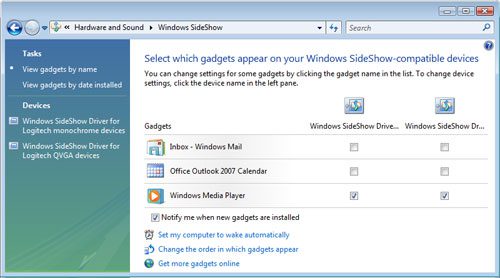
Now restart the computer and when you close WMP 11 it will not keep running as a process. (If you dont want to restart, just kill the two process “wmplayer” and “WMPsideshowgadget”).
If you know any other tweaks that can help with this issue, do leave us a comment below.




Alfred,
Thanks for the post. I was just catching up with your posts and crazy as it is, I had this exact issue just a few hours ago. A DVD, would not stop playing, so matter what I did. Glad to see you have addressed this!