
 Many of us own digital cameras that can take pictures as well as videos. The problem with the video taken is that a 10 minute video can take about 1GB space on your computer ! We need to compress the video by lowering the bitrate while using a suitable codec to compress and decompress the video.
In this tutorial we will use VirtualDub which is an extremely efficient video capture and processing program. It can be used to compress an MJPEG AVI file (digital camera’s usually save in this format) to Divx/Xvid AVI video with MP3 audio.
How to compress AVI Video using VirtualDub – Guide
First we need to download VirtualDub. Extract the zip file and open the VirtualDub application.
Choose File > Open Video File (Ctrl+O)
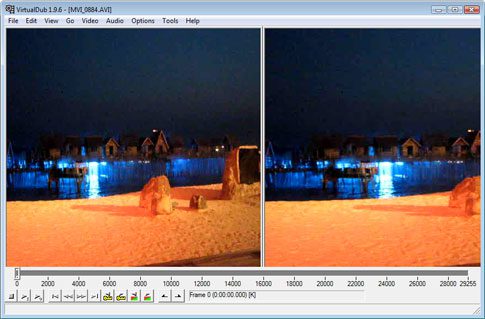
Select the file you wish to open. You should see a screen similar to the one below.
Now from the Video menu choose Compression (Ctrl+P). We will be using the Xvid MPEG-4 codec for compressing this file (Divx is also a good choice but Xvid is opensource). Incase you do not see it, download Xvid.
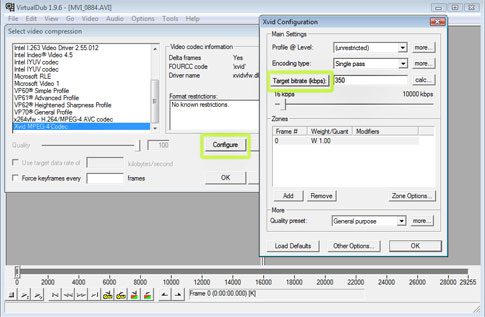
Choose Xvid MPEG-4 Codec and click Configure. Now click on target quatizer, the button will change to Target bitrate. Enter 300-350, which is a good rate for videos to be shared on the web. You can enter a higher rate if you like. Click Ok on both the boxes to get back to the main screen.
Now go to the Audio menu and choose Full Processing Mode.
Again go to the Audio menu and choose Compression. Choose MPEG Layer-3, check Show all Formats. Choose a bitrate for the audio, 128kBit/s should be enough.
Last but not least go to File > Save as AVI (F7). Choose a location and name to save the file.
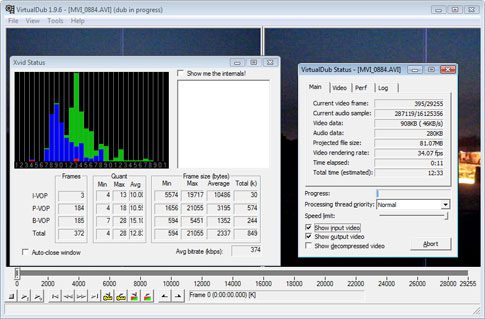
VirtualDub will now compress the file. In my case, the 800MB file was compressed to 80MB while loosing a little quality. A small price to pay for a huge reduction in file size. Play with the bitrate setting to your liking.




Nice and very useful.Thanks.
.-= Don´s last blog ..Google Sites Liberation [DOWNLOAD] =-.
I liked it. So much useful material. I read with great interest.
If you want good clarity I recommend 700 as the bitrate
Thank you for sharing virtual dub. It helps a lot to have a knowledge in compressing files. The more space you gain the better.
What a great idea for a post! Thanks for sharing I really enjoyed it.
Nice article, thanks.
Dear,
http://www.kitchentantra.com/2009/09/plagiarism-updated.html
Malar
This is a pretty good piece of software. Might have to review it on http://crenk.com
Its a very good tool.
Thanks for it.
This is really helpful information! I’ve hated to delete some videos in the past because they took up too much room! This is a great tip, and now I know how to store all of my videos without using all of my computer space!
Thanks a lot for the excellent blog…once again thanks you are very sweet.
After reading, I learned a lot. This is a good article.
So fun article is! I know more from it.
I AM GLAD TO VISIT AND SEEN YOUR IDEAS,BUT I NEED SOME QUESTION ABOUT THIS SUBJECT,CAN YOU ANSWER ?
This is a nice site. The discussion an on going discussion and analysis of the moral the fact that this is so ought to be an embarrassment to white liberals who are die. Thanks for sharing informative post. beautiful !!!
excesses, not in any way as a 2012 campaign blueprint or manifesto.” Those comments were seen as a softening of Perry’s stance on Social Security.
SANTA ANA, Calif. – The FBI says former NBA player Javaris Crittenton has
pensions Médaille n’agit pas en conformité avec la moralité et de compétence émis, mais si travaillé