
Some wmv files can have problems when played with media players like GomPlayer. The video will play but you will be unable to seek (skip to another part of the video). Here is a small command line software that can fix WMV files for you.
How To Fix WMV file seek problems
We are going to use a command line utility called asfbin that can fix the index of wmv files without having to recode the entire file. This means that even huge files can be reindexed quickly.
Afsbin is available for download from Radioactive pages. This is a command line utility which means you will have to work with the command prompt. Most of my readers here will not be familiar with is so I have a simpler way for you, dont worry !
Download Asfbin and also download this bat file (right click and save target). Now unzip asfbin to a location on your computer. Copy the bat file into the same folder.
Copy any wmv file that needs to be fixed into the asfbin folder. Run the reindex.bat file.
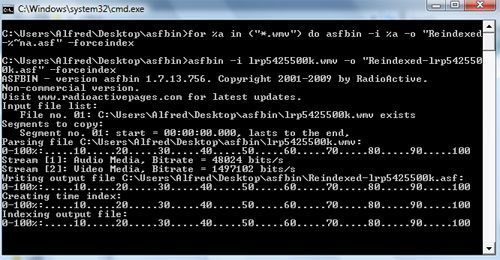
This should reindex most wmv files and fix the skipping / seeking problem. This utility can also be used to work with asf and wma files.




Try this!
0.Open Gom Player
1.Click Preferences
2.Click On Filter
3.Then Select Use WM ASF Reader
4.Close Gom Player
5.Re-Open Gom Player & Wma File
Should Play
6.If I Does Not Play Select Use Windows Media souce filter Or Select Play Using Gom Player’s internal source
7.Remember To Repeat Steps 4.&5. When Selecting A New Setting
8.If You Get Your File Working The Gom Player Seems To Know How To Handle .Wmv Files.(Set It Back To Automatically Select Source filter (Recommended)
Great solution. Thank you
This is of great help to me. Thank You So Much..
I have some Important Videos which are really essential to view for job but unable to do becoz of seek problem, With your Solution I got rid of the problem.. Thanks Again..!!