
 When we upload pictures to Flickr or Slide, it seems to take ages to upload them. This is probably because you have high Megapixel camera. The photos would usually have a very high resolution and size making it difficult to share the photos.
Fotosizer is a freeware batch image resizer tool that lets you resize your pictures to the desired resolution in just three steps. Just add the folder or the photos to resize, select the desired resolution and click start.
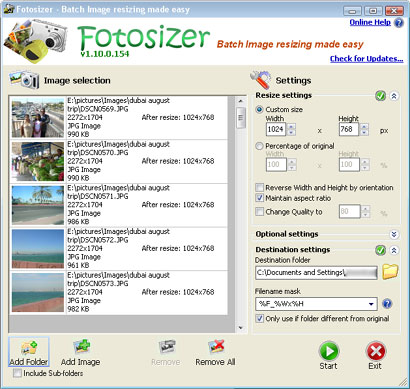
This is one program that is going to find a permanent spot in my computer. It will help my mom resize her photos before uploading them to blogger, saving her a lot of space (blogger provides only 1gb of storage).

Fotosizer is for Windows only, there are no Mac or Linux versions.




I recommend microsoft powertoy image resizer
http://www.microsoft.com/windowsxp/downloads/powertoys/xppowertoys.mspx
Just right click on any picture and resize them (warn that the picture size is fix to 4 sizes only). But you can drag and resize in a batch too. Fast and easy and pretty lightweight program
Yes, fast and simply program.
I want to recommend an online resizer. I have been using reshade.com to resize my images. I have been very satisfied with the site. I like being able to resize images without losing the quality of my images