
Get Original Size Photo from Flickr


I’ve been interested in Photography for a few months now and most photographers seem to share pictures on Flickr. If you like to share photos its definitely the place to be.

Once pictures are uploaded to Flickr, it resizes them to fit viewing in different sizes on the site. Clicking on the all sizes button above a picture will show you the different sizes of the picture that can be downloaded. Unfortunately the max size is limited here. It does not give you an options to download the actual photos that was uploaded into Flickr.
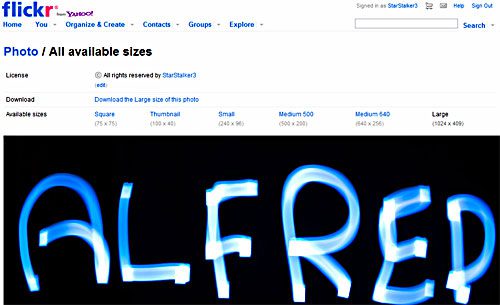
First you will need either Firefox or Safari as your browser. Head over to Flickr Original Bookmarklet and grab it. Restart your browser and follow the instructions.

There was an awesome service called Get Flickr but that does not work anymore. If you are willing to spend the time, this post on Flickr File name theory might prove interesting and can help you download all size images.


This post is about how to get original images flickr,how to get original size photo from facebook.

Related posts:

  1. Facebook Photo Uploader and Downloader
  2. FlauntR.com – One click photo effects
  3. Free Online Photo Editor – Aviary
  4. Download Facebook Photos and Albums
  5. JAlbum.net – free web photo album


Discover and Share Take a moment to share this post on social networking sites !
The Author
Alfred is a Pilot & Tech blogger from Bangalore, India. He has worked with DSL providers like AOL, SBC, Verizon & Covad as a tech specialist. Currently he is pursuing a career in aviation.
View other post by


Did you enjoy this post? Why not leave a comment below and continue the conversation, or subscribe to my feed and get articles like this delivered automatically each day to your feed reader. If you don't have a feed reader, you can always have these articles delivered to your email inbox every day. Click here to sign up.

No comments yet.

Leave a comment

(required)

(required)


Line and paragraph breaks automatic, e-mail address never displayed, HTML allowed: <a href="" title=""> <abbr title=""> <acronym title=""> <b> <blockquote cite=""> <cite> <code> <del datetime=""> <em> <i> <q cite=""> <strike> <strong>