
 Most people prefer to store their passwords for different sites in their browsers. This is actually a very dangerous thing to do. Though it might help you to login faster and save the trouble of entering the password each time, these passwords can easily be decrypted my someone using your computer. They can also be hacked if there is a new security loophole for the browser.
When people visit our How to get back a hacked Gmail account post, the first thing that comes to my mind is, the guy probably stored his password in the browser and his friend read it. Even finding passwords in Outlook is easy.
If you forget a Google password, you can get it back if you have a secondary email setup with Google or use the help page for hacked accounts. The application below can help you out if you use other Google applications on your computer and have account information stored in them.
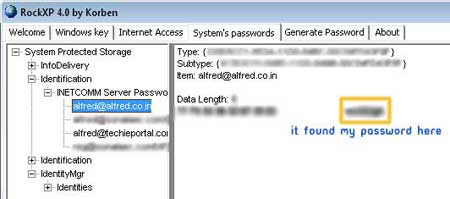
Security expert Nagareshwar Talekar has a site with many tools that can recover passwords stored in browsers, instant messengers and other applications. This is just one of his applications, check out the download page for others.
Find Stored Google Password in Applications
GooglePasswordDecryptor is a free tool to recover Google passwords stored in different applications. Google applications like Gtalk, iGoogle, Google Desktop Search and Picasa store the passwords in a encrypted form to take out the hassle of entering the password every time the application is used. This tool can decrypt the passwords stored by Google applications.
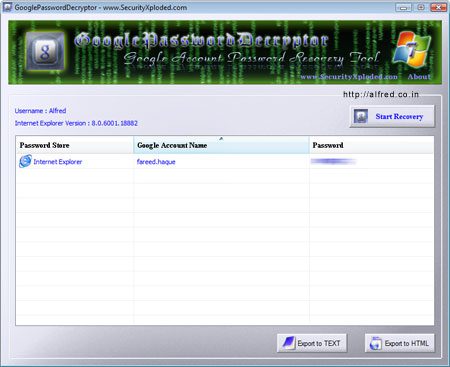
Sorry but I dont store passwords in my apps, so none were detected. Added one in IE for testing. (PS :- I dont use Internet Explorer)
Download Google Password Decryptor
Find Passwords Stored in Browsers
Nagareshwar Talekar’s site also contains two additional tools that can help you get passwords stored in browsers.
Chrome Password Decryptor and IE Password Decryptor can show stored the passwords stored by them.
We know that most people stored their passwords for easy access. So, we recommend using the free Last Pass password manager extension for browsers.




It is scary how can passwords easily be found on a computer.
In fact, this is very dangerous. While it can help you connect quickly and avoid the hassle of entering the password each time passwords can be easily deciphered my someone using your computer.
very useful information!
thank you for share
Hi Sir Alfred,
I am desperate as i cant retrieved my gmail account, it was been hacked. my secondary email add, secret question and password has been change.
as i was browsing for related topics, i’ve seen that most people testify that you were able to help them. hope you can help me also.
Thanks
This is quite a scary post, it just makes me think how we should take care of our passwords, as they’re the keys to our accounts. I used to store some of my passwords, but after reading this, I’ve removed them all. Thanks for the advice.
There is nothing I can do personally, you just need to fill up the form with all the information you can think of about your account to convince them you are the owner.
In fact, this is very dangerous. If we can help you communicate quickly and avoid the hassle of typing your password each time passwords can be easily deciphered my someone using your computer.