
 The default copy / move in Windows is quite slow. There are free programs that can help you speed up this process by upto 3 times the rate at which normal windows copy would. In this post we will look at 4 software that can help you to copy or move files faster in Windows.
TeraCopy
Teracopy is the most popular program that helps you speed up the copy / move process in windows. TeraCopy uses dynamically adjusted buffers to reduce seek times. Asynchronous copy speeds up file transfer between two physical hard drives.
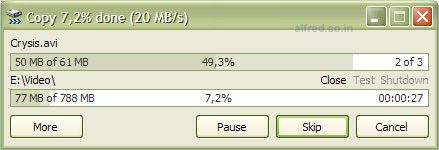
Pause copy process at any time to free up system resources and continue with a single click. In case of copy error, TeraCopy will try several times and in the worse case just skips the file, not terminating the entire transfer. It shows failed file transfers and lets you fix the problem and recopy only problem files.
There is a portable version available that can run directly from your USB device or external hard disk. This is the software I prefer to use.
Extreme Copy
Extreme Copy is another freeware that can speed up the copy process by 20-120%. The speed increase is really noticeable on large files.
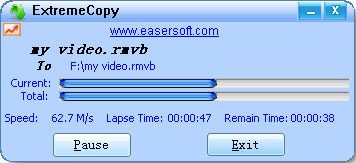
It also support pausing the copy process and shows an estimated time remaining for the copy process.
Supports error processing, it will not stop the copy process if a few files have errors, so that you dont have to copy all the other files again.
Super Copy
Super Copy provides a very robust way to copy files in Windows. Super Copy does not prompt you for more information once the copy has started; all options are specified beforehand. This is simply a lightweight interface for XCOPY, and will not negatively affect your system’s performance.
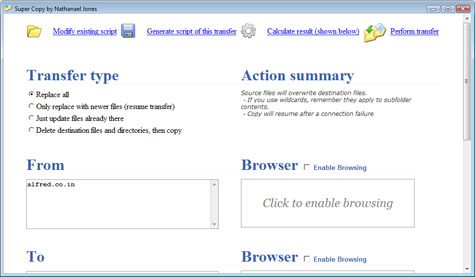
Features
- “Calculate Results” mode allows you to see what files will be affected.
- “Open” and “Save” allow you to import and export automatically generated batch files
- Resume ability – recover from a power failure without having to restart the process.
- Log summaries
- Handles large amounts of data (over 100GB per transfer)
- Ignores locked files
- Copies hidden/system files
- Recovers from temporary network disconnects
Fast Copy
This program claims to be the fastest program that can copy files (untested). Seems to have a lot of support for command line.




Cool! Cool! This will really help me copy files faster. Thank you for sharing us these freewares! They are really helpful. Nice post!
Nice article, thanks.
glad i could help
Thanks for the heads up Alfred. This would make my daily laptop to desktop backup faster. Btw, do you know any programs , free or paid, that can automatically back up the contents of my drive or folder? I’m searching for one that can automatically detect if the file has been modified or not and maybe have an option to keep older version of the file.
Nice and informative post once you have blog you have to update the news… so that only it is more effective.
Nice and informative post … i really enjoyed ur post keep up the good work
thanks for the comment Dan.
There is one free Windows power tool that can do that for you. Was planning to write about it soon, its called SyncToy.
It has a few settings that can do what you need. Get it from Microsoft. SyncToy 2.0
http://www.microsoft.com/Downloads/details.aspx?familyid=C26EFA36-98E0-4EE9-A7C5-98D0592D8C52&displaylang=en
Thanks!
A good review about this tools
Cool! I will now spend lesser time to copy my files. Great application.
cigars online
Copy or move to any data transfer performance depends on your drive media, if it has no error’s its will work faster.
speech writing
This is very fast tool to move data in hard drive from location to another location.
nice information.
thanks.
i will try those 4 software.
:D
use robocopy
All we want is speed when copying files…i used some third party softweres for copying large files and almost it works great…currently i used gs rich copy which is equally usefull to compare with others….but as i say all we want is speed, so gs gives me better speed then others..it is my opinion may be others are also good.