
I have a windows mobile 6 phone (HTC Touch) and was wondering if there was a way to send and receive SMS from the computer rather than typing it on the phone keyboard. Nokia and Sony Ericcson have the PC suite which lets you do this. My quest to find a solution ended in this software…
MyMobiler is a free software that allows you to view and control your windows mobile 5 or 6 phone from your computer. You can control the phone with the computers mouse and keyboard. It also allows you to cut/copy paste text between your computer and the phone.
Features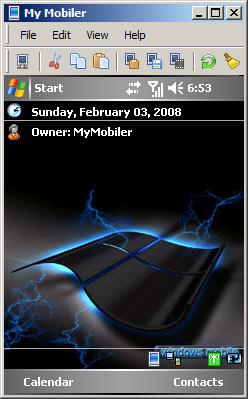
- View your mobile screen on your desktop.
- Control your mobile by using desktop keyboard and mouse.
- Copy/Cut/Paste text between mobile and desktop.
- Capture mobile screen.
- Drag and drop files to your mobile.
- Support ActiveSync / IP Connection
- Support Mobile Explorer (File Browse)
Supported OS
- Support Windows Mobile 2003
- Support Windows Mobile 5.0 / 6.0




thanks , but how to installthe above
connect your phone via active sync install the software. start using it !
Thanks much for the post.
What computer operationg system dos it work with? (windows vista, windows 7)?
Thanks!
I have used it with Windows Vista and Windows XP. Not sure about 7, but if it runs on XP 7 should work fine too.
dear my friend,take my greet.i using samsung windows mobile sgh i750,when i connect with wifi,then it connected,after i open open any wap site,but it not opening,giving sms me-check ur connection setting,can u tell me what can i do about that,
i also want to connect to pc with my mobile,but i dont have that softwer,how can i get it,
if u give me a good suggest it will helpful for me,thanks