
Get detailed information about your computer hardware


Sometimes when friends ask me to reinstall Windows, they would not have the driver CD for their motherboard. In such situations how do you know what driver to download and install ? I was using Everest 3D benchmarking tool which is a paid software that gives detailedĀ informationĀ about each and every hardware in a computer.

Recently I came across a freeware that can tell you most of the information you would need to know what hardware is installed on the computer.

HWiNFO32 is a freeware application that can show detailed information about your computer’s hardware . The software is only 2MB. After installation it starts up with a screen that shown all the basic info that would be needed to know a systems configuration.
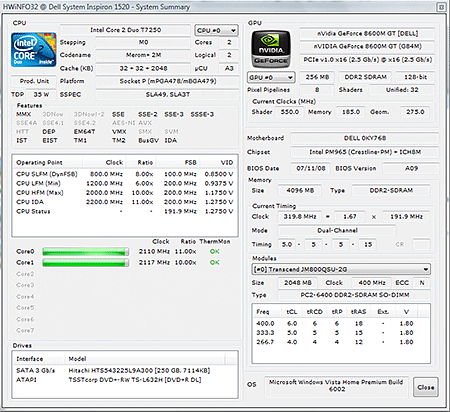
Once this screen is closed you can see the actual main screen of the application. This screen showns the basic components of the computer and clicking of each brings up a much more detailed view of that component.
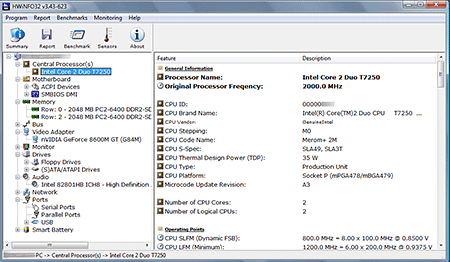
There is also a sensors function available that can shown you the temperature of your GPU and CPU which is useful to know if your computer is overheating. Overall a very useful tool to have when trying to find drivers for computer’s when you dont know the system configuration.


Download HWiNFO32

This post is about computer hardware,detailed information about computer hardware,detailed information on computer,detailed computer information,detail about computer hardware,computer hardware detail information,computer hardware detail,how to get detailed information on computer hardware,detailed information of computer hardware,how to know computer detail information,detailed information or detail information,detailed report on computer hardware,get detailed information about your computer,get detailed information your pc,hardware detail of computer,how can i find the computer detail information.

Related posts:

  1. Find information about your hardware & software
  2. Vista Shutdown Timer – Turn off computer after a set time
  3. Mobiler – Control your windows mobile phone from computer
  4. How to send sms from computer using Sony Ericsson phones
  5. How to automatically shutdown computer


Discover and Share Take a moment to share this post on social networking sites !
The Author
Alfred is a Pilot & Tech blogger from Bangalore, India. He has worked with DSL providers like AOL, SBC, Verizon & Covad as a tech specialist. Currently he is pursuing a career in aviation.
View other post by


Did you enjoy this post? Why not leave a comment below and continue the conversation, or subscribe to my feed and get articles like this delivered automatically each day to your feed reader. If you don't have a feed reader, you can always have these articles delivered to your email inbox every day. Click here to sign up.

Trackbacks & Pingbacks

No trackbacks/pingbacks yet.

Comments

I think everyone would want to know everything they can about their hardware. It is just human nature! I’m sure a lot of people will be able to use this information for their personal or business use.

Leave a comment

(required)

(required)


Line and paragraph breaks automatic, e-mail address never displayed, HTML allowed: <a href="" title=""> <abbr title=""> <acronym title=""> <b> <blockquote cite=""> <cite> <code> <del datetime=""> <em> <i> <q cite=""> <strike> <strong>