
 Everyone has to format their computers some time or the other. Downloading each program and installing it can be a tedious process. Waiting for each program to download, then installing each one. We will show you an easy way to get popular software installed in one go.
Ninite is a application that allows you to choose multiple software to download and install without the need to manually install each one. It installs software with the default settings and makes sure that unwanted toolbars usually included with software are not installed.
Ninite works on Windows XP, Vista and Seven; 32bit and 64bit are supported. It can automatically detect which you language and download the latest version of the software you want.
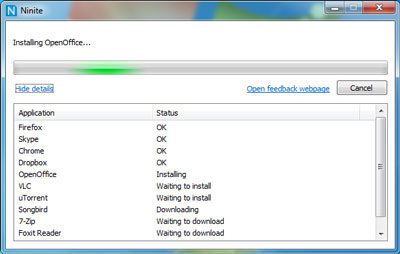
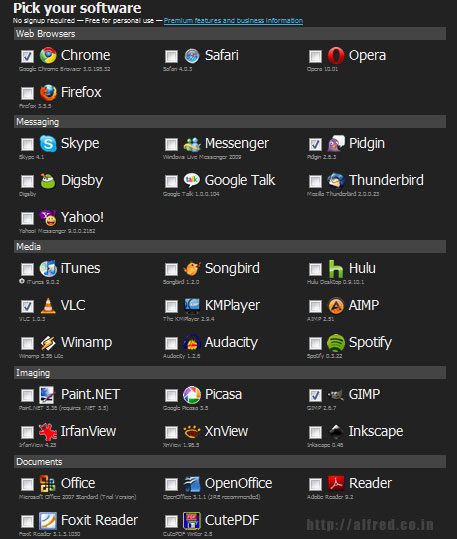
To install programs, select the ones you wish to install (all popular software are shown). Click the Get Installer button below the page. Save the file and run it. Ninite will download and install all the programs you selected without any action from the user.




Nice! Now, I can download different apps at the same time. This software is so cool. Thanks for sharing the information.
This was an excellent tutorial! thanks for sharing. it’s definitely a new learning for me.
Thank you for sharing this info. I’ll definitely use this next time i reformat my PC.
Thank you very much. I’m going to put this too good use.
I read a few topics. I respect your work and added blog to favorites.
Great article. I found it very informative, i will be using from now. Thanks for the sharing the information.
Interesting work there. I think this would really be a good idea if I share it with others.
10nx a lot god bless you
thanks a lot subhi, thats the best think ive heard from a reader on this blog
thank you very much ..i found it really usefull..but one questions, do i need to be connected online?..if so, then i wish there are programs that added what i need from excution file of the those programs..so i have full control..but thanks
nice
can u provide me a arabic programs
thank you very much