
Most second hand hard drives bought from ebay or shops contains tons of information that can be recovered. This might include confidential information like phone numbers, adresss, credit card and banking details, etc. Its vital that the data on hard drives and USB drives be completely and securely deleted before lending or selling it to someone. If this is not done, someone could use data recovery software to restore the data that you thought was deleted. We did a post on data recovery software here.
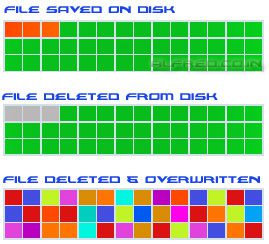
The way most OS store a file is by placing a marker that will tell the OS where the file exists. When you delete a file, the OS does not acutally delete the data, it only deletes the marker pointing to that file. The files data will still exist on the hard drive till new data is written over it. The image below should be helpful in understanding this.
So lets get on to software that can overwrite data and secure your file deletion.
DeleteOnClick :- Right click a file to securely delete a file from the Windows menu. Follows the U.S. DOD 5220.22-M secure file deletion standard.
Simple File Shredder :- A simple tool that lets you drag and drop files that you want to securely delete.
Wipe File :- This allows you to delete files or directories. Allows you to choose between different methods.
Zilla Data Nuker :- Deletes files and also has ability to overwrite the free space on hard disk. Securing previously deleted data.
Darik’s Boot and Nuke :- a boot disk that securely and completely delete the contents of any hard disk. Good tool to wipe a hard disk before selling or giving it away.
Know any other tools that might help us ? Let us know, leave a comment below.




