
Free up RAM usage – Memory Cleaner
Many programs written for Window XP do not clean up their used RAM when you exit the application. Lesser RAM means your computer will work slower. Windows Vista and windows 7 have considerably much better memory management than XP but this program can help increase your computer’s performance.
Memory Cleaner is a free memory management program that can help free up unused memory. It can also clear the system cache and trim the memory used by a program.
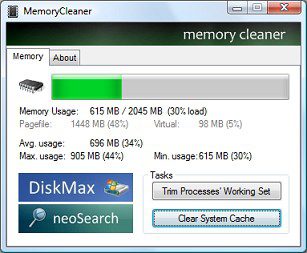
The program is quite lite, only 375KB and is very simple to use.
Features
- Trims processes’ working set.
- Clears system cache.
- Monitors RAM usage and reports minimum, maximum and average.
- Reports Pagefile and virtual memory usage.
I would also like to wish all the readers a Happy New Year 2010.
This post is about how to free up ram usage,free up ram usage,how to free ram usage,how to clear up ram usage,how to free up memory usage,free up memory used,free up memory usage windows xp,release ram in use,memory ram usage,how to free up ram usage in windows 7,how to free up ram usage?,ram memory cleaner for windows xp,how to free up system memory usage,how to free up system ram usage,how to free up your ram usage,memory cleaner nasıl kullanılır.Related posts:
- Windows 7 – Free RAM and Optimize Memory
- Windows SteadyState – Let no one change the settings on your computer
- Free software to monitor Files and Folders
- Free Comodo Internet Security Pro 3.8 License
- Glary Utilities – Free PC Optimizer
Discover and Share Take a moment to share this post on social networking sites !
View other post by Alfred
Did you enjoy this post? Why not leave a comment below and continue the conversation, or subscribe to my feed and get articles like this delivered automatically each day to your feed reader. If you don't have a feed reader, you can always have these articles delivered to your email inbox every day. Click here to sign up.
Trackbacks & Pingbacks
[...] Free up RAM usage – Memory Cleaner | TechiePortal – Alfred's Tech Blog Tagged as: e mail address, email inbox, free memory, pc optimizer, performance memory, unused memory Leave a comment Comments (0) Trackbacks (0) ( subscribe to comments on this post ) [...]
[...] see our post about Memory Cleaner of Windows, another program that has similar functions. TuneUp Utilities is also highly recommended if your [...]
Comments
Leave a comment
Line and paragraph breaks automatic, e-mail address never displayed, HTML allowed: <a href="" title=""> <abbr title=""> <acronym title=""> <b> <blockquote cite=""> <cite> <code> <del datetime=""> <em> <i> <q cite=""> <strike> <strong>


wowww
Awesome! Please feel free to include this on your website. The more I use it, the more it impresses me.
