
 Metro 2033 is an FPS game based on a post-apocalyptic Moscow and the Metro tunnels below it. The game features a lot of Physx and is known to have multiple stability issues. Here we have tried to collect most of the errors / crashes and how to fix them.
Metro 2033 Crash Black Screen Fix
The first thing you want to do if the game crashes is updating your graphics card. If you dont know what graphics card you have, right click on your desktop, go to display properties and click advanced settings. You should be able to see the model of your graphics card, head over to the manufacturers website and update the drivers for these.
Second most important thing to prevent metro 2033 crash is to install all the additional software that came with the game. Go to the games DVD folder, install all the additional software like Directx, Physx and Runtime C packages. It is important to install them even if you have newer versions.
Metro 2033 crashes after intro video
This usually happens after the game worked once and you changed any video settings. It could also happen if the configuration file is corrupted. For this error we need to reset the user.cfg file on your system.
Open My computer and go to the following folder (the Appdata folder might be hidden)
C:\Users\yourusername\AppData\Local\4A Games\Metro 2033
Delete the user.cfg file in this folder and run the game.
Metro 2033 no menu / escape key does not work / cannot move
Sometimes after deleting the user.cfg file it might not contain the keybindings for the game.
Start the game, go to options > controls > keyboard and click reset to default.
You should now be able to move around in the game, incase the Escape key does not work you will have to add that binding manually in user.cfg
Go to C:\Users\yourusername\AppData\Local\4A Games\Metro 2033 and open the user.cfg file in Notepad
Add bind changemenumap kESCAPE in the line after unbindall
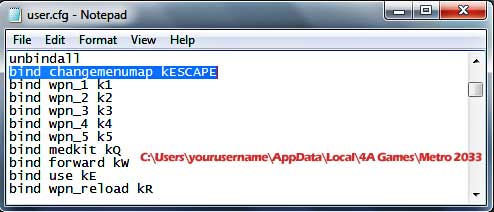
The menu should work while playing the game.
There is a know issue with Alt+Tabbing, incase you cant alt+tab back into the game, just do it a few more times and the game will switch correctly. Also wanted to add that some people report that switching between Directx 10 and 9 can improve stability depending on your system configuration.




