
Almost everyone who uses computers has important information lying around that could potentially be misused. Locking the computer with a password does help but there are times when you might have to share your computer with someone and you really dont want people getting their hands on your private files.
My Lockbox is a freeware application that allows you to password protect folders on your Windows computer. The protected folder will be hidden from all users including the Administrator.
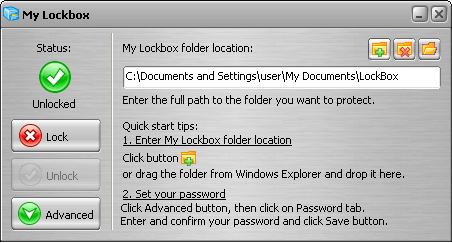
The program is easy to use. Just select the lockbox location and enter a password during the setup. After the setup is complete the lockbox will be hidden and locked until you enter the correct password.
The application has the option to change the lockbox location, password and protection status; incase you need to chage it after the initial setup. It also supports skinning to suit your eyecandy needs.
Features and benefits
- Very easy in use
- Almost any folder on your computer can be password protected
- Instant protection – no file scrambling or moving to another place
- Lockbox folder is inaccessible even by the system administrators
- Lockbox folder is inaccessible both locally and remotely.
- Lockbox folder can be protected in Windows safe mode
- Windows XP x64 support
- Hotkeys support – you can popup Control Panel with a simple keystroke.
- Skinned user interface
- Freeware
[ Download My Lockbox ]




Very cool…It’s almost surprising Microsoft doesn’t have something like this built in, although permissions can be set on folder like this.
Thats good to hear
Maybe you could post an article on your blog or guest blog on mine on how to do it with windows permissions.
that is good to use software for encrypt the folder but sometimes mostl people want the coding mean tip to encrypt folder wihout software.