
Remove unwanted files from Startup


If your computer has become slow over time it is probably because of the many programs that launch themselves when Windows starts up.

Chances are you dont want many of these programs to run at startup since they would just be a memory hog. An example would be Quicktime, IM’s, iTunes Helper, Nero Check etc. You do not need them to run on startup with windows because you may launch them when needed.

Starter is a small but powerful program that functions both as a startup manager and process monitor. Using Starter, you can uncheck programs from the list to remove it from Windows startup. You may also recheck the program later if you really needed it.
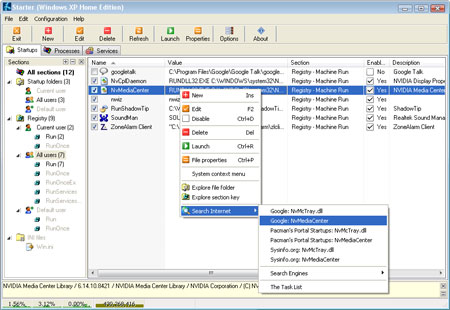
Starter Screenshot

If you dont know an item on the list, just right click and choose Search Internet option. This will provide you more information to help you decide if you need to keep the item.

As a general rule you can remove most items which are not related to your antivirus, firewall or system drivers. eg. Winamp agent, abode launcher, Google Talk, etc

There is also another way of doing this via msconfig.

Start > Run > type msconfig > click OK > go to Startup tab and check or uncheck the items.

Please do not try this method unless you know what your doing.

This post is about how to delete unwanted files from computer,how to remove gtalk from startup,how to delete unwanted files,delete unwanted files from pc,startup files,how to remove unwanted files from computer,remove google talk from startup,how to remove unwanted files from pc,how to clean unwanted files from computer,delete unwanted files,remove unwanted files,remove google talk startup,how to remove google talk from startup,how to remove unwanted files,how to delete unwanted file from pc,google talk startup.

Related posts:

  1. WinDirStat – find and delete unwanted files
  2. How to speedup your computers startup process
  3. Find Duplicate Music / MP3 Files
  4. Remove Rapidshare Wait Time
  5. Unblock Programs from Vista Startup – How to


Discover and Share Take a moment to share this post on social networking sites !
The Author
Alfred is a Pilot & Tech blogger from Bangalore, India. He has worked with DSL providers like AOL, SBC, Verizon & Covad as a tech specialist. Currently he is pursuing a career in aviation.
View other post by


Did you enjoy this post? Why not leave a comment below and continue the conversation, or subscribe to my feed and get articles like this delivered automatically each day to your feed reader. If you don't have a feed reader, you can always have these articles delivered to your email inbox every day. Click here to sign up.

No comments yet.

Leave a comment

(required)

(required)


Line and paragraph breaks automatic, e-mail address never displayed, HTML allowed: <a href="" title=""> <abbr title=""> <acronym title=""> <b> <blockquote cite=""> <cite> <code> <del datetime=""> <em> <i> <q cite=""> <strike> <strong>
