
Simple File Shredder – Delete files so they cant be recovered


Simple File Shredder is a security tool that allows you to securely delete files so that they cannot be recovered.When a file is deleted in Windows, the OS does not actually delete it. Instead it marks the space occupied by the file as free so that new data can be written over it. The deleted file will exist in a recoverable state until it’s over-written with other data.
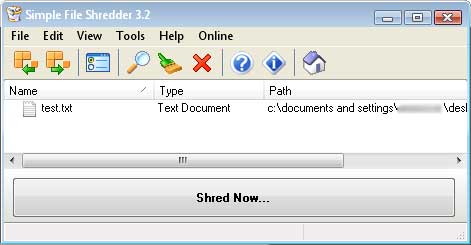
sfileshredder.jpg

Simple File Shredder deletes files by scrambling the file name and over-writing the file with random bytes before deleting it. It can also securely shred the data left behind on the free space of you hard drives.

Just drag and drop the files into the program and click the Shred button or right click on a file and choose Simple File Shredder from the shell integration. The program can also be protected from misuse using a password available in the program’s options.

[ Download Simple File Shredder ]
[ RapidShare Mirror ]

This post is about how to delete files so they cannot be recovered,simple file shredder,file shredder for samsung galaxy s2,file shredder shell integration,can you recover files from simple file shreader,how to remove data so that it cant be recover,how to remove data which cannot be recovered,recover the deleted shredder file,samsung s2 recovery article in bangalore mirror,sfs file shredder,shell integrated file shredder,simple file shredder megaupload,simple file shredder mirror,how to delete that it cannot be recovered by software,how to delete recovered files,File Recover and Shredder rapidshare.

Related posts:

  1. Five tools to securely delete your data
  2. Recover Deleted Files Freeware – Recuva
  3. Recover deleted files – How to
  4. Repair corrupted ZIP files – How to
  5. WinDirStat – find and delete unwanted files


Discover and Share Take a moment to share this post on social networking sites !
The Author
Alfred is a Pilot & Tech blogger from Bangalore, India. He has worked with DSL providers like AOL, SBC, Verizon & Covad as a tech specialist. Currently he is pursuing a career in aviation.
View other post by


Did you enjoy this post? Why not leave a comment below and continue the conversation, or subscribe to my feed and get articles like this delivered automatically each day to your feed reader. If you don't have a feed reader, you can always have these articles delivered to your email inbox every day. Click here to sign up.

Trackbacks & Pingbacks

No trackbacks/pingbacks yet.

Comments

ur simply good

Very informative tech tips, thank you for sharing!

can you give us more education on thist pleaseeeeeeeeeee!!!!!!!!!!!!!!!!!!!

sorry , i wanted to ask for a more information on this plz

i saw some expert able to retrieve deleted file, does this confirm cannot retrieve by them?

People say even this might not remove the files completely :D You are better off frying your HHD

wow, first time know about this. thanks for the sharing.

Leave a comment

(required)

(required)


Line and paragraph breaks automatic, e-mail address never displayed, HTML allowed: <a href="" title=""> <abbr title=""> <acronym title=""> <b> <blockquote cite=""> <cite> <code> <del datetime=""> <em> <i> <q cite=""> <strike> <strong>
