
SmartUAC – Replace Vista UAC with a better alternative

How many times did you have to click “continue” on the Vista UAC for programs that you run everyday. If only there was a way for UAC to remember that you allowed the program before and not ask you everytime.

smartuac

We had written about one such tool, Norton UAC. This free program allows you to remember your UAC choice for different programs.

SmartUAC is another UAC replacement alternative for Vista. So why is this better than the Norton UAC ? It has a database of programs which blocks the program if it is considered to be malicious. When Smart UAC identifies malicious program, a red prompt window appears and asks you weather you want to kill detected threat or allow it.

The software also allows you to remember your choices for different programs. It can then automatically allow or deny them, the next time you run it.
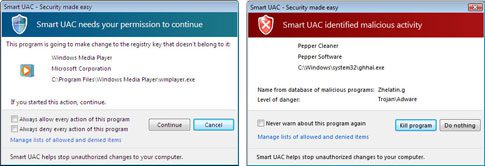
smartuac-prompt

SmartUAC will scan every program that is run and check them for trojans, spyware and other malicious software against its inbuilt databse. The database used by SmartUAC is updated regularly via the internet. You can also whitelist and blacklist programs and manage them from the SmartUAC settings.
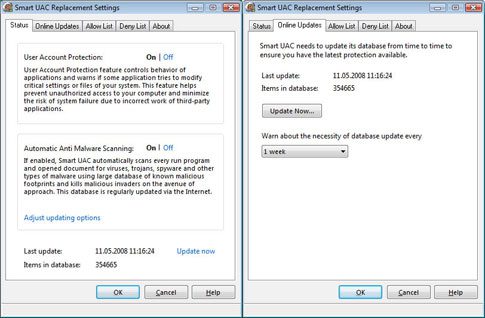
smartuac-settings

Would I recommend this over Norton UAC ? Hmmm I am quite happy with Norton’s AUC replacement and dont really need a program to tell me if the file is safe or not.


Download SmartUAC


Related posts:

  1. Alternate UAC for Vista from Norton
  2. Vista Shutdown Timer – Turn off computer after a set time
  3. Vista Tricks and Shortcuts
  4. Unblock Programs from Vista Startup – How to
  5. GIMP – The opensource alternative to Photoshop


The Author
Alfred is a Pilot & Tech blogger from Bangalore, India. He has worked with DSL providers like AOL, SBC, Verizon & Covad as a tech specialist. Currently he is pursuing a career in aviation.
View other post by Alfred

Discover and Share Take a moment to share this post on social networking sites !

Did you enjoy this post? Why not leave a comment below and continue the conversation, or subscribe to my feed and get articles like this delivered automatically each day to your feed reader. If you don't have a feed reader, you can always have these articles delivered to your email inbox every day. Click here to sign up.

Trackbacks & Pingbacks

[...] could, instead of turning UAC off completely use software like smartUAC ( http://alfred.co.in/software/smartua…r-alternative/ ) to remember the programs which you want to run, without really compromising your [...]


Comments

Thanx for the info..Its really great to know this…..

:( No 64bit support

Leave a comment

(required)

(required)


Line and paragraph breaks automatic, e-mail address never displayed, HTML allowed: <a href="" title=""> <abbr title=""> <acronym title=""> <b> <blockquote cite=""> <cite> <code> <del datetime=""> <em> <i> <q cite=""> <strike> <strong>