
 Got a call from an old friend of mine since he wasn’t able to uninstall windows media player 11.
Uninstalling WMP 11 seems easy but there is one small step that users miss out on.
So, here is a step by step guide to uninstalling windows media player 11.
Steps to uninstall windows media player 11
- Make sure that any plug and play music or video devices like iPod’s are disconnected from your computer.
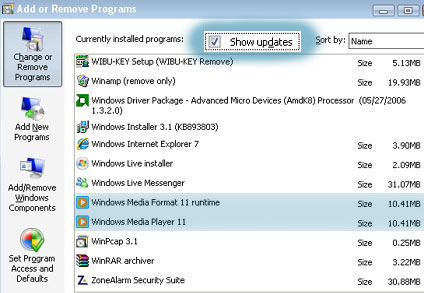
- Open Control Panel, click Add or Remove Programs, and then click Remove a program.
- Check the Show Updates check-box on top of the add/remove list.
- Select Windows Media Player 11 from the list and click Change/Remove.
- Click OK on both the confirmation boxes that appear.
- Restart the computer once the uninstall is complete.
- Again, open Control Panel, click Add or Remove Programs, and then click Remove a program.
- Select Windows Media Format 11 Runtime from the list and click Change/Remove.
- Click OK on both the confirmation boxes that appear.
- Restart your computer again.
- Open Add/Remove programs once more (frustrating isn’t it :roll: )
- Select Microsoft User-Mode Driver Frameworks Feature Pack 1.0 from the list and click Change/Remove.

- Follow the instructions, if the Wudf01000 confirmation dialog box appears, click Yes to continue and click finish.

One small request, if you used this guide, please leave a comment that would make me very happy :-D




it helped me greatly. thanx
7000 page views on this post and finally someone posts a comment !!
Thanks phil, glad I could help.
lol – I came across your guide when I was unsure about the step ‘deleting Wudf01000’ in another guide. But as you have it too, I’m happy to go delete – thanks :grin:
:mrgreen: Thank you Alfred. I did everything you indicated. You are the only one who mentions removing the feature pack. I have a question and hope maybe you can answer it :?: I want to install WMP9 now but I keep getting a message that “a more recent version of” WMP is installed and the setup quits. :mad: I’m seriously considering getting a LINUX laptop when this one finally dies. :roll:
Hi I was wondering about removingMicrosoft User-Mode Driver Frameworks Feature Pack 1.0 from my computer. When the Wudfo1000 dialog box comes up it says that removing this can cause other programs not to work. Is it safe to remove the User-Mode driver without screwing up other programs?
The uninstall instructions were bang on!
The only thing I noticed was that the rollback from WMP 11 setup WMP 10 differently from before.
I should also note that the reason I had WMP 11 on my machine was that it said my WMP 10 was corrupt and it was fixing it. When done it put WMP 11 on?
Thank you so much.
Really glad to hear that I was able to help you with the WM11 installation.
I tried to uninstall WMP11 however, it always says I can’t do it as a file is missing. What can I do about this? Please help.
good work among others stuff on the web
sydneyweb’s last blog post..Free Norton Antivirus 2009 – link
thank you very much for the instructions on removing media player 11(which sucked) going back to wmp9…thanks
its a nice message
hi and thanks – XP Lite Pro will also remove this nervy bastard… BUT (and now comes the big BUT): if the WMP is deinstalled, I don’t find a way to rip after with my usual programms (e.g. DVDx and DivX-Codec 6.x) THey only work if the WMP is still installed – even never used.
Do someone know a way to get the missing *.dll’s or whatever WMP takes with him in the grave while uninstall? I use Win XP SP3
howefer, thanks to alfredo and all the others out there which try to make Windows comfortable
I recently had a hard drive die. I reinstalled xp pro sp2 from a disc I had and it came with wmp11 installed..(ie 7 as well ugh) I would really like to be able to remove wmp11 and go back to wmp10. Anyone have any ideas as this guide only works if you have a pre-dated wmp11 version installed before wmp11 took over.. I would really appreciate anything anyone can do to help. I wouldn’t mind wmp11 so much but when viewing the navigation pane in the library module it only gives ‘title’ and ‘length’ columns when viewing a playlist or the ‘now playing’ list of songs.. I never had this issue before… my email is [email protected]
Hi Alfred,
Thanks for sharing your knowledge. However, I’m using Windows Vista and cannot uninstall Windows Media Player 11. I also cannot change the settings. It’s been installed as the default player for videos & audio files. That’s why I want to uninstall it. Would be grateful if you could tell me how to ?
Thanks.
This post shows you how to uninstall windows media player 11. If for some reason you can’t atleast post your error message so that I can help you.
I just added your blog site to my blogroll, I hope you’ll think about doing the same.