
 There are time when you might be running a program or downloading a file and want to go away from the computer. Here is a simple program that can shut down the computer after a given time period.
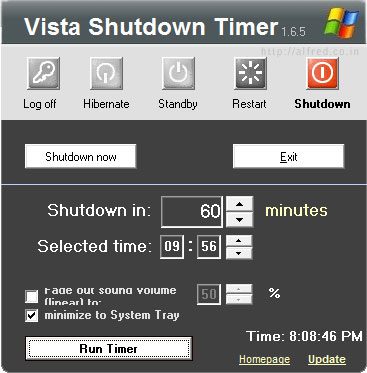
Vista Shutdown Timer is a free software that can shutdown, sleep, restart or hibernate your computer. It is also portable since its only an exe file that can be placed anywhere.
Using the program is very simple. Just choose what you would like your computer to do, set a time and click run timer. Once the timer finishes counting down, the computer will perform the action you assigned.
Features
- Portable
- On Screen Display
- Supports command line parameters
- Supports manuel killing of hanging programs
- Minimize to system tray
If you are looking for a similar software for Windows XP, read How to automatically shutdown computer.
Download Vista Shutdown Timer




Great Insight.
I am definitely going to use it.
Hope to see some more stuff from you in future.
Vista: I have not found one program that works when you use the LOGIN function and the screen saver function with resume LOGIN. It seems that once your “LOGOUT” has happend some restriction prevent the execution to happens. Comments ??
I’ll redraw last comment. The problem was an hangup in the screensaver that caused the Shutdown problem.