
Visualizer Photo Resize – Save disk space without loosing quality

I own a Cannon PowerShot 470 camera and use it quite a bit to take photographs when I am flying or go on vacations. As most owners of high mega pixel camera’s would have noticed, each photo takes about 1-2 MB. This can take a huge chunck of the disk space. I have been using this freeware that allows your to reduce the space of the photo without loosing any image quality.

Visualizer Photo Resize is a freeware that can batch (multiple) convert or resize images between different formats and sizes. It supports JPEG, GIF, PNG, BMP, TGA, TIFF, PSD & PSP formats. Images can be resized to sizes that can be specified on the starting screen of the program.
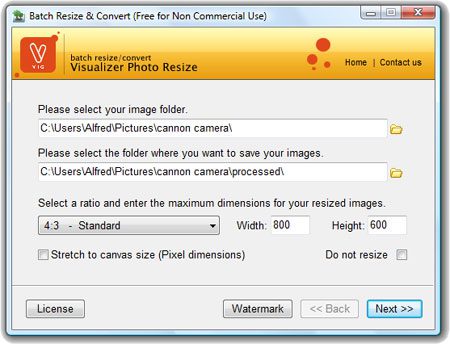
Visualizer Photo resize
The magic of Visualizer Photo Resize lies in its ability to optimize images. Just go through the resize wizard while checking the do no resize option. This will keep the original size of the image and will also compress it to save disk space. This does not affect the quality of the image as far as I have seen. The image below shows how it saved 150+mb while optimising the latest set of pictures I took on my digital camera.
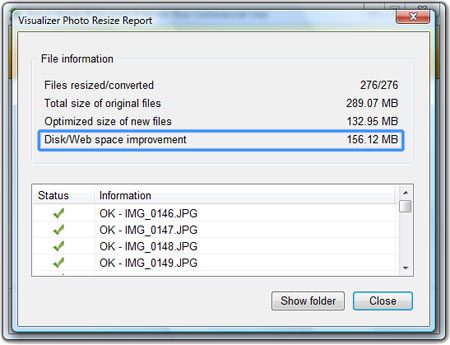
Visualizer Photo resize

[ Download Visualizer Photo Resize ]


Related posts:

  1. Fotosizer – batch image resizer
  2. What is HD Photo and will it survive
  3. Ashampoo Photo Commander 5 Full Free
  4. Windows Media Encoder – VirtualDub alternative to compress video
  5. Gmail.com – Increases storage space


The Author
Alfred is a Pilot & Tech blogger from Bangalore, India. He has worked with DSL providers like AOL, SBC, Verizon & Covad as a tech specialist. Currently he is pursuing a career in aviation.
View other post by Alfred

Discover and Share Take a moment to share this post on social networking sites !

Did you enjoy this post? Why not leave a comment below and continue the conversation, or subscribe to my feed and get articles like this delivered automatically each day to your feed reader. If you don't have a feed reader, you can always have these articles delivered to your email inbox every day. Click here to sign up.

No comments yet.

Leave a comment

(required)

(required)


Line and paragraph breaks automatic, e-mail address never displayed, HTML allowed: <a href="" title=""> <abbr title=""> <acronym title=""> <b> <blockquote cite=""> <cite> <code> <del datetime=""> <em> <i> <q cite=""> <strike> <strong>