
Most people love the eye candy in Vista. One of the best in this category is the Flip 3D function. It is an alternative to Alt+Tab that we use in XP.
 WinFlip is a program that provides the Flip 3D function in WinXP. Winflip displays all open windows in a 3D stack, which the user can flick through and select using the keyboard or mouse.
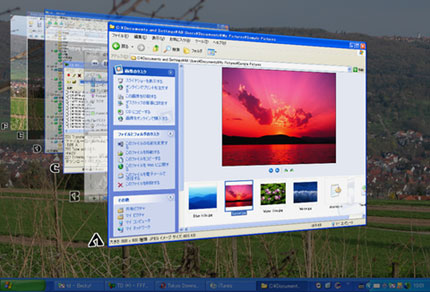
The above image should give an idea of this feature.
While WinFlip is running, you can flip windows on the desktop using Win+Tab key.
If you love eye candy or want to show off with friends, this is definitely a must have ;)
Download latest version here




Love it and use it occasionally. One thing… I added it to run at windows startup using TuneUp Utilities StartUp Manager and I think that may have been a mistake. I believe (could be wrong because I also installed a bunch of other programs @ same time) that it damaged my Direct3d Driver when I went ahead and had it run at startup (I’m thinking it conflicted with the loading of Nvidia driver(s)) . Don’t really know, but had to reinstall NVidia Driver’s non-the-less. Am using WinFlip now, but only start it manually from desktop.
same with me… i dont know whats wrong with it, coz each time i put it at windows startup it always say that 3D failed…hmp!
could someone out there help us please… we are not that good in computer programming and troubleshooting^^,