
TCP/IP 6 – Explained


An IP address (Internet Protocol address) is a unique address that each computer uses to communicate using the internet. The IP address acts as a locator for one IP device to find another and interact with it.

Most of us who are used to computers have at some point had to setup the IP and DNS settings to connect to the internet. Vista has a new option in the connection properties – TCP/ IP v6. This was never seen in Windows XP.
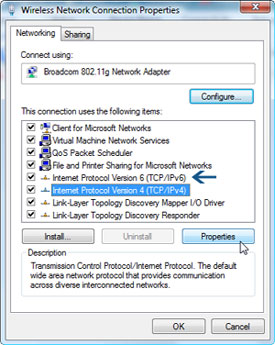
tcp_ip.jpg

So what is TCP / IP 6 ? The current version of TCP / IP in use is v4 which is a 32 bit number (example 122.177.127.157). A 32 bit number can represent upto 4 billion unique IP addresses. Now more and more people using computers, its just a matter of time before all these unique IP’s are in use.

TCP / IP v6 is a 128 bit number, made up of hexadecimal digits separated by colons. An example would be something like 85ah:16ag:3wfg:324m:63rh:64gd:3sgh:987f

For now there is nothing to worry about, but in due time we will have to switch to the new version. Its good to know that Vista is prepared to make the switch.

You can read more about IP address at Wikipedia

This post is about tcp/ip6,tcp ip6,tcp/ip 6,ip6 explained,tcp/ıp6 şifresi,tcp/ıp6 dns ayarları,tcp/ip explained in a picture<,TCP/IP,tcp/ iP6,tcpip6.

Related posts:

  1. Vista DRM Problems – you ought to know before an upgrade
  2. Disable USB Autorun – How to
  3. Tabbed Browsing for Windows Explorer – QTTabBar
  4. Vista increase half open ports for better torrent download speed


Discover and Share Take a moment to share this post on social networking sites !
The Author
Alfred is a Pilot & Tech blogger from Bangalore, India. He has worked with DSL providers like AOL, SBC, Verizon & Covad as a tech specialist. Currently he is pursuing a career in aviation.
View other post by


Did you enjoy this post? Why not leave a comment below and continue the conversation, or subscribe to my feed and get articles like this delivered automatically each day to your feed reader. If you don't have a feed reader, you can always have these articles delivered to your email inbox every day. Click here to sign up.

Trackbacks & Pingbacks

No trackbacks/pingbacks yet.

Comments

Simple and effective tutorial. :smile:

Leave a comment

(required)

(required)


Line and paragraph breaks automatic, e-mail address never displayed, HTML allowed: <a href="" title=""> <abbr title=""> <acronym title=""> <b> <blockquote cite=""> <cite> <code> <del datetime=""> <em> <i> <q cite=""> <strike> <strong>
