
Ping services let search engines and blog directories know that you have updated the content on your blog. This allows them to index the new content when the ping is received.
The more services you ping the more likely you are to get traffic from those sources. Here is the ping list I have been using for my blogs.
List of Blog Ping Services
http://1470.net/api/ping
http://api.feedster.com/ping
http://api.feedster.com/ping.php
http://api.moreover.com/ping
http://api.moreover.com/RPC2
http://api.my.yahoo.com/RPC2
http://api.my.yahoo.com/rss/ping
http://bblog.com/ping.php
http://bitacoras.net/ping/
http://blog.goo.ne.jp/XMLRPC
http://blogdb.jp/xmlrpc
http://blogmatcher.com/u.php
http://blogoole.com/ping
http://blogroots.com/tb_populi.blog?id=1
http://blogsearch.google.com/ping/RPC2
http://blogsnow.com/ping
http://bulkfeeds.net/rpc
http://coreblog.org/ping/
http://godesigngroup.com
http://godesigngroup.com/blog/feed
http://imblogs.net/ping
http://lasermemory.com/lsrpc
http://mapufacture.com/georss/ping/api
http://mod-pubsub.org/kn_apps/blogchatt
http://ping.amagle.com
http://ping.bitacoras.com
http://ping.blo.gs/
http://ping.blogg.de/
http://ping.bloggers.jp/rpc/
http://ping.blogmura.jp/rpc/
http://ping.cocolog-nifty.com/xmlrpc
http://ping.exblog.jp/xmlrpc
http://ping.fakapster.com/rpc
http://ping.feedburner.com
http://ping.myblog.jp
http://ping.rootblog.com/rpc.php
http://ping.syndic8.com/xmlrpc.php
http://ping.weblogalot.com/rpc.php
http://ping.weblogs.se/
http://ping.wordblog.de
http://pinger.blogflux.com/rpc/
http://pingoat.com/goat/RPC2
http://pingqueue.com/rpc/
http://popdex.com/addsite.php
http://rcs.datashed.net/RPC2/
http://rpc.blogbuzzmachine.com/RPC2
http://rpc.blogrolling.com/pinger/
http://rpc.britblog.com/
http://rpc.icerocket.com:10080/
http://rpc.newsgator.com/
http://rpc.pingomatic.com/
http://rpc.tailrank.com/feedburner/RPC2
http://rpc.technorati.com/rpc/ping
http://rpc.weblogs.com/RPC2
http://rpc.wpkeys.com/
http://services.newsgator.com/ngws/xmlrpcping.aspx
http://signup.alerts.msn.com/alerts-PREP/submitPingExtended.doz
http://snipsnap.org/RPC2
http://thingamablog.sourceforge.net/ping.php
http://topicexchange.com/RPC2
http://trackback.bakeinu.jp/bakeping.php
http://weblogues.com/RPC
http://www.a2b.cc/setloc/bp.a2b
http://www.bitacoles.net/ping.php
http://www.blogdigger.com/RPC2
http://www.blogoole.com/ping/
http://www.blogoon.net/ping/
http://www.blogpeople.net/servlet/weblogUpdates
http://www.blogroots.com/tb_populi.blog?id=1
http://www.blogshares.com/rpc.php
http://www.blogsnow.com/ping
http://www.blogstreet.com/xrbin/xmlrpc.cgi
http://www.catapings.com/ping.php
http://www.focuslook.com/ping.php
http://www.godesigngroup.com
http://www.holycowdude.com/rpc/ping
http://www.imblogs.net/ping/
http://www.lasermemory.com/lsrpc/
http://www.mod-pubsub.org/kn_apps/blogchatter/ping.php
http://www.newsisfree.com/RPCCloud
http://www.newsisfree.com/xmlrpctest.php
http://www.popdex.com/addsite.php
http://www.rssfwd.com/xmlrpc/api
http://www.rssfwd.com/xmlrpc/api
http://www.snipsnap.org/RPC2
http://www.weblogues.com/RPC/
http://xmlrpc.blogg.de/
http://xping.pubsub.com/
http://xping.pubsub.com/ping/
https://phobos.apple.com/WebObjects/MZFinance.woa/wa/pingPodcast
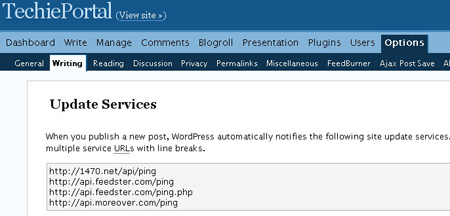
How to use this list in WordPress
- Login to WordPress with your admin account
- Click on options and then click writing
- Copy & paste the list above into the update services box
- Click Update options
Please don’t copy this list to another blog, link back here if required.




I believed i was significantly happy to disclose this fact web-site.I want to for with thanks by the part of your energy while in the passion of it pleasant impute in the market to!! Now i for certain using every single and every website not so big trace of the usb ports and share person saved as a favorite which can onto real bushy-tailed goods you and your family article.
This is exactly what I need!
Thank you !
Btw. how do you find them?