
Split files for burning on CD or DVD
Imagine you have a huge files (lets say 7GB) that you downloaded from the internet and you want to store or share this file on a DVD. How can you write a 7GB file on a 4.5GB DVD ? Read on…
While there are many programs that allow you to split files, the simplest way is to use Winrar or Winzip.
How to split the file for burning onto a CD or DVD using Winrar
1. If you have multiple files put them in a folder.
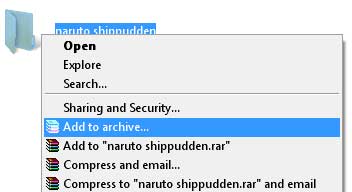
2. Right click the folder and choose “Add to archive”
3. In the Archive name and parameters box, choose the medium who are going to write the file on.
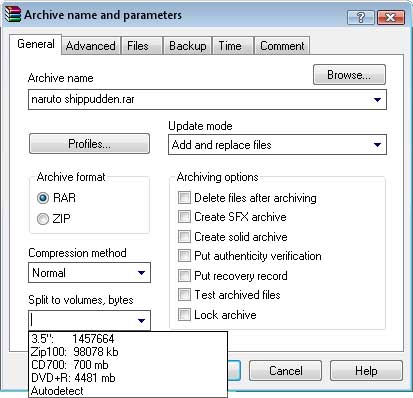
4. Optional :- choose the “Create SFX archive” option if want it to be a self extracting archive (like program setup’s)
Once the process is done you should have multiple zip archives. You can now burn these files on separate DVD’s.
To join the file back to its original format, just extract it like a normal zip archive.
This post is about splitting dvd files,how to split dvd files,split file for burning,how to split dvd file,split dvd file,how to split a dvd file,split files for burning cd,split files dvd,how to divide large files on dvd,split file dvd,split cd files,burn dvd split,split burning,split burning of cd contetn,split dvd to cd burner,split files over dvd.Related posts:
- Use Gmail with split pane like Outlook
- Hide Zip Files inside Image – How to
- Repair corrupted ZIP files – How to
- Find Duplicate Music / MP3 Files
- Easy-Share.com – Make money sharing files
Discover and Share Take a moment to share this post on social networking sites !
View other post by Alfred
Did you enjoy this post? Why not leave a comment below and continue the conversation, or subscribe to my feed and get articles like this delivered automatically each day to your feed reader. If you don't have a feed reader, you can always have these articles delivered to your email inbox every day. Click here to sign up.
Trackbacks & Pingbacks
How to recover blog in blogger When it counted as spam in blogger?…
I have face major problem with my blog that it was not spam and blogger take my blog as spam….Can any one help me to recover my blog back…..
Comments
Leave a comment
Line and paragraph breaks automatic, e-mail address never displayed, HTML allowed: <a href="" title=""> <abbr title=""> <acronym title=""> <b> <blockquote cite=""> <cite> <code> <del datetime=""> <em> <i> <q cite=""> <strike> <strong>


i will try it out myself
its more easy with MegaSplit
( http://byakugan.altervista.org )
Really useful – thanks!
