
Our flying school has a Printer and the students like to use it to print forms and other material required for flights. It is kinda hard to keep going to school to print files all the time. Thats when we found PrinterShare…
 With PrinterShare® you can print documents and photos on other people’s printers as easily as on the local one connected to your machine. No special technical knowledge is required from both – printer owner and user. With this software you can print directly from your application such as Microsoft Word, Outlook, Photo Editor or any other program you work with to a printer connected to another computer next door or ten thousand miles away.
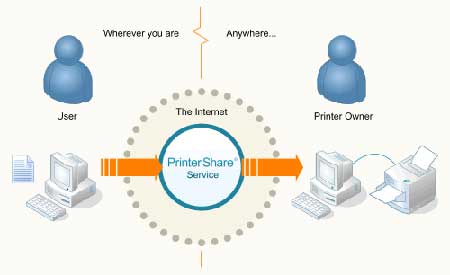
By using industry-standard encryption algorithms it ensure fast and secure delivery of the electronic printing materials (not your original documents!) to the other end. You can also control how many copies should be printed on the paper.
[ Download PrinterShare ]




But what is the use if I print somewhere in Africa when I were physically present in America? Please bear with my ignorance, could you elaborate the purpose?
Its more like, ur at home but can print on your office computer..
Thanks Alfred…thank you so much for sharing the info.
But I still have to run back to my office to lay hands on the printed document. Hhmm..still I don’t see a practical use of this. Probably something is still unclear to me.