
Check multiple social networks for a username availability


Social Networking has become an important part of everyone online presence. It would be easier for someone to find you, if you had the same username on most social networks right ? How do you know if the username is taken or not on different networks ?

Namechk is a free web service that allows you to check for a username’s availability in 90 different social networks. It really simple, just enter the username you wish to use and click the chk button. The page updates with the status of all the social networks.
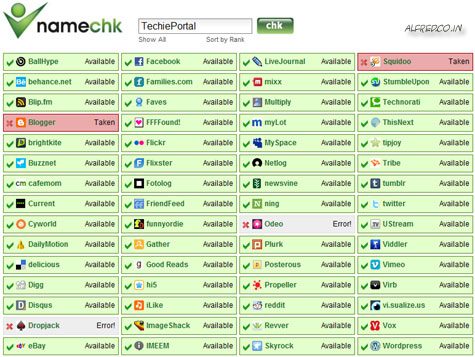
namechk

Try Namechk

This post is about check username availability,how to check social network usernames,Username availability online.

Related posts:

  1. How to connect to multiple wifi networks
  2. Google Buzz – Google attempts social networking again
  3. Custom Social Networking code for WordPress
  4. Flock – social networking browser
  5. Check if your system can run a game before you buy it


Discover and Share Take a moment to share this post on social networking sites !
The Author
Alfred is a Pilot & Tech blogger from Bangalore, India. He has worked with DSL providers like AOL, SBC, Verizon & Covad as a tech specialist. Currently he is pursuing a career in aviation.
View other post by


Did you enjoy this post? Why not leave a comment below and continue the conversation, or subscribe to my feed and get articles like this delivered automatically each day to your feed reader. If you don't have a feed reader, you can always have these articles delivered to your email inbox every day. Click here to sign up.

No comments yet.

Leave a comment

(required)

(required)


Line and paragraph breaks automatic, e-mail address never displayed, HTML allowed: <a href="" title=""> <abbr title=""> <acronym title=""> <b> <blockquote cite=""> <cite> <code> <del datetime=""> <em> <i> <q cite=""> <strike> <strong>
