
HearWho.com – Convert Text into MP3 to listen on your iPod
Hearwho is a service that allows you to convert text into mp3. This can be quite useful when you need to catch up on the latest news or would like to listen to a big report.
Just paste the text you need to convert into an audio file in the text box. Choose the voice, language and voice quality and hit convert to have your text converted into an audio file.
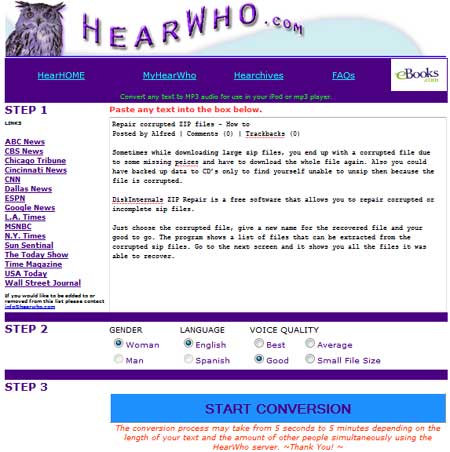
The file can then be transferred to your iPod so that you can listen to it on the go. The website also has links to popular news sites.
I have many ebooks about flying aircraft, usually use this service to convert the text into audio files that I can listen to while waiting in the airport.
This post is about hearwho com,text into mp3,convert text into mp3,hearwho,hearwho com convert text to audio,review hearwho,text converts into audio free,text to speech converter hearwho.Related posts:
- Listen to text from web pages
- Convert Image to text – Free online OCR services
- Best text to speech MP3 Podcast software
- Convert Video, Audio and Images to different formats for free
- Free online text to speech convertor – Japplis Speech
Discover and Share Take a moment to share this post on social networking sites !
View other post by Alfred
Did you enjoy this post? Why not leave a comment below and continue the conversation, or subscribe to my feed and get articles like this delivered automatically each day to your feed reader. If you don't have a feed reader, you can always have these articles delivered to your email inbox every day. Click here to sign up.
Trackbacks & Pingbacks
[...] Free webapp Hearwho converts text you enter into an MP3 audio file you can download. Select from a male or female voice, English or Spanish text conversion, and choose the quality of the resulting file at Hearwho. Similar to previously covered VozMe, the results are no substitute for a professional actor hired to read an audio book, but if you’ve got text you’d like to listen to while commuting or working out the results aren’t bad at all. HearWho.com [via Techie Portal] [...]
[...] [via Lifehacker and Techie Portal] [...]
[...] [via Lifehacker and Techie Portal] [...]
[...] Free webapp Hearwho converts text you enter into an MP3 audio file you can download. Select from a male or female voice, English or Spanish text conversion, and choose the quality of the resulting file at Hearwho. Similar to previously covered VozMe, the results are no substitute for a professional actor hired to read an audio book, but if you’ve got text you’d like to listen to while commuting or working out the results aren’t bad at all. HearWho.com [via Techie Portal] [...]
[...] you do not want to use an external application for text to speech you can also look at HearWho or Japlis Speech, websites with text to speech. You can also use a browser addon like Internet Text [...]
Comments
Leave a comment
Line and paragraph breaks automatic, e-mail address never displayed, HTML allowed: <a href="" title=""> <abbr title=""> <acronym title=""> <b> <blockquote cite=""> <cite> <code> <del datetime=""> <em> <i> <q cite=""> <strike> <strong>


Really?, it’s nice to convert text into mp3
I much prefer the YAKiToMe! website (http://www.yakitome.com) for free text to speech. Why pay money to HearWho when YAKiToMe! gives you much more for free? YAKiToMe! has more voices, more features, more capabilities, is easier to use … and it’s all free. Check it out.
